

Checked against YouTube Help on October 28, 2026. The feature details below come from YouTube's official A/B test titles and thumbnails page. YouTube changes eligibility and wording without much notice, so confirm the options in your own Studio before building a plan around them.
You upload a video, add three thumbnails, and wait. Two weeks later Studio gives you a one-word verdict: inconclusive. You are back where you started, except now you have three thumbnails and a mild grudge against the word inconclusive.
That result is common, and most of the time it is accurate. The test did its job. The setup did not give it enough to work with.
This guide covers how Test & compare actually picks a winner, the sample sizes involved, the mistakes that stall a test, and a plan you can repeat. It includes a hypothetical worked example and a planning table you can copy into a spreadsheet.
What YouTube's Test & compare actually does
The feature is called Test & compare, and it is available in YouTube Studio on a computer. The rules that matter, from YouTube's help page:
- You can test up to three titles and three thumbnails.
- The test can run as title only, thumbnail only, or title and thumbnail together.
- You need to enable advanced features on your channel.
- It does not work on Shorts, scheduled Live streams, Premieres, made-for-kids videos, age-restricted videos, or private videos. Live archives can be tested. A Premiere becomes eligible after it ends and converts to a regular long-form video.
- A test should complete within two weeks. It can finish in a few days.
- The option with the highest watch time share is shown to all viewers after the test.
- If there is no clear winner, the first title or thumbnail you uploaded stays as the default.
- YouTube may keep a small control group on the default packaging. Those viewers are excluded from the test calculations.
- If you edit the title or thumbnail during the test, the test stops automatically.
YouTube also warns that low-resolution files get downscaled. If any thumbnail is below 720p (1280 x 720), every thumbnail in the test is reduced to 480p. Upload the highest resolution you have.
Watch time is the judge, not click-through rate
Most creators assume the test compares CTR. It does not.
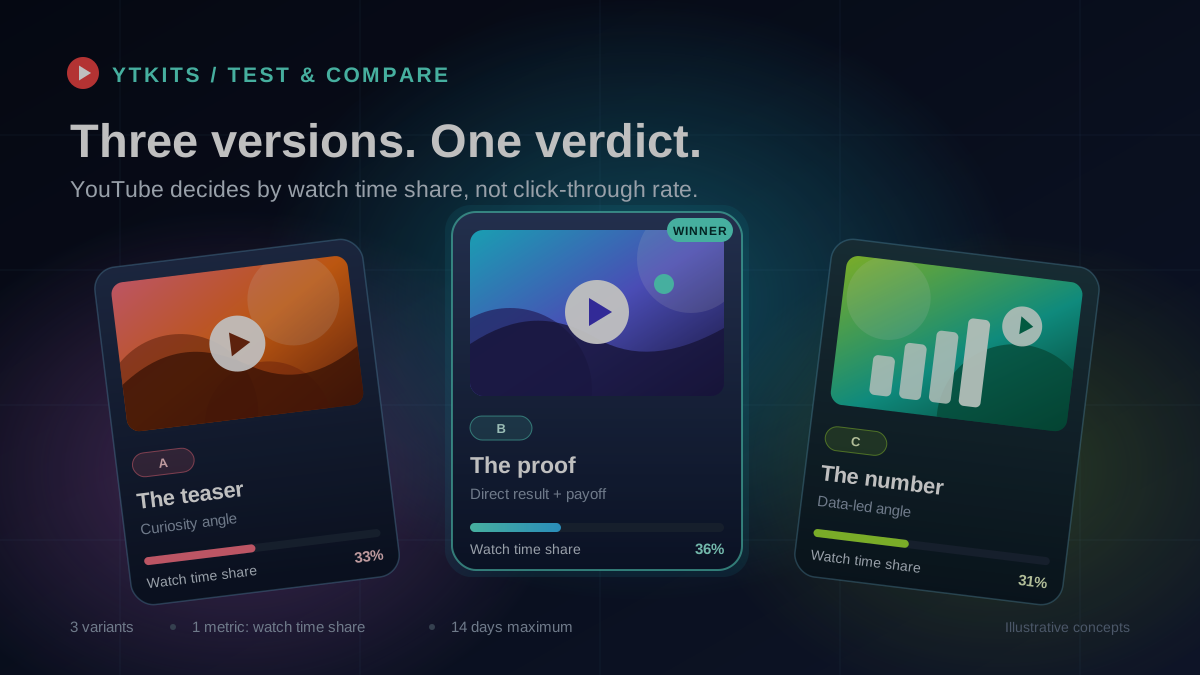
YouTube says it optimizes tests for overall watch time rather than click-through rate. The reasoning is in the FAQ: a thumbnail should help the right viewer find the video. A click that ends in a quick exit does not do that. A shocked-face thumbnail can win the click and lose the viewer fifteen seconds later. Watch time share punishes that.
This changes how you read a result. A variant can have the lowest CTR in the test and still win, because the people who clicked stayed longer. I have seen this exact pattern in my own Studio reports, and it confused me until I stopped treating CTR as the scoreboard.
CTR still matters. It is a useful diagnostic. It is just not the metric that decides this particular experiment.
The three verdicts and what to do next
YouTube reports one of three results. Each one points to a different next move.
| Result | What YouTube says | What I do |
|---|---|---|
| Winner | One option clearly outperformed the others based on watch time share, with statistically significant results from viewers. | Keep it. Let it run for a few weeks before changing anything else. |
| Performed Same | The test ran and all options performed about the same. There is no clear winner, so you pick. | Keep the default. Test a different element or a different video next. |
| Inconclusive | There was no strong statistical difference between the options. The first upload becomes the default. | Treat it as an underpowered test or variants that were too similar. Do not rerun the exact same test. |
There is also a fourth, less official outcome: the test stops before finishing. That usually means you edited the title or thumbnail, or the video was not eligible. Fix the cause and start again.
The control group is why your numbers look off
YouTube may hold back a small percentage of traffic as a control group. Those viewers only see the default title and thumbnail, and their performance is removed from the experiment.
This is normal. It also explains why the impressions in your test report may not add up to the impressions on the video's main analytics card. Do not try to reconcile the two by hand. They are measuring slightly different populations.
Why most tests end without a winner
After the control group and the two-week window, the remaining reasons are usually predictable.
The variants were too similar
YouTube says testing titles or thumbnails that are too similar can make a test run longer because there is not enough difference to separate them. Changing the border color or swapping one background element is not a real test. Pick variants that make different promises or use clearly different compositions.
The video did not have enough impressions
This is the biggest one. A test needs traffic to reach a conclusion. If a video gets 2,000 impressions a week, splitting that across two or three variants leaves each arm with very little data. No statistical method can rescue a sample that small.
The test started too early
YouTube recommends testing older videos first, partly to limit the impact on your channel. A fresh upload also has an unusual audience mix: subscribers and returning viewers dominate the first days, then Browse and Search traffic arrives. Early results can reflect who was watching, not which thumbnail is better.
You changed the packaging mid-test
Editing the title or thumbnail stops the test. I have done this by accident while fixing a typo in a title. If it happens, restart and leave the metadata alone until the test finishes.
You tested titles and thumbnails at the same time
Testing both together is useful when you want to know which complete package wins. It tells you nothing about whether the title or the thumbnail caused the change. If you want a lesson you can reuse, test one dimension at a time.
The audience mix shifted
A test that runs during a traffic spike from one source can produce a winner that does not hold up later. YouTube notes that early impressions skew toward viewers familiar with the channel, while later impressions include more new viewers. That is another argument for testing established videos with stable traffic.
The video was not eligible
Shorts, private videos, scheduled Lives, Premieres, made-for-kids videos, and age-restricted videos cannot run the test. If the option is missing, check those settings before assuming the feature is broken.
The traffic math behind "inconclusive"
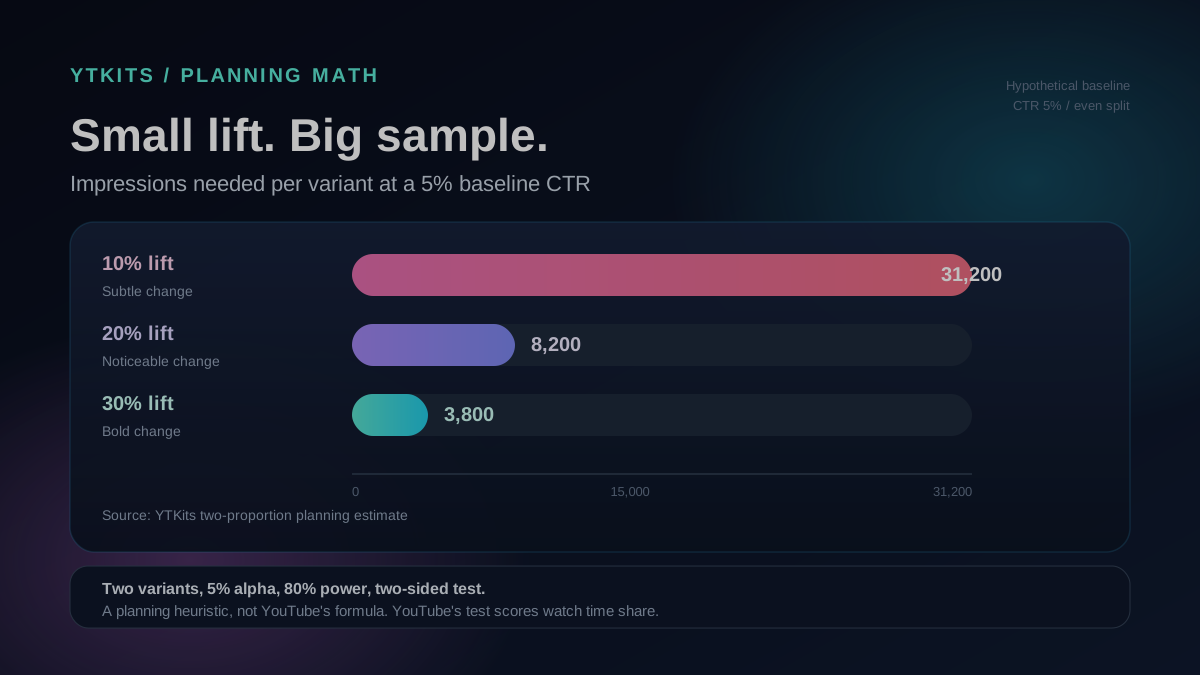
Here is a planning table I put together for two-variant tests. It estimates how many impressions each variant needs to detect a real difference in click-through rate, using a standard two-proportion test with 5% significance, 80% power, and a two-sided test. The numbers are rounded.
| Baseline CTR | 10% relative lift | 20% relative lift | 30% relative lift |
|---|---|---|---|
| 4% | 39,500 | 10,300 | 4,800 |
| 5% | 31,200 | 8,200 | 3,800 |
| 8% | 18,900 | 4,900 | 2,300 |
Read the middle row. If your video has a 5% CTR and you want to detect a 10% improvement, you need roughly 31,200 impressions per variant. Two variants means about 62,400 impressions total. A 20% improvement needs around 8,200 per variant. A 30% improvement needs about 3,800.
The lesson is uncomfortable: subtle thumbnail changes need huge samples. Bold changes need far fewer.
Now compare that with your actual traffic. Suppose the video gets 3,000 impressions a day and the test splits traffic evenly. Each variant sees about 1,500 impressions a day. At that rate, a 10% lift needs about 21 days of testing, which is longer than the tool's two-week window. A 20% lift needs about 5.5 days, which is realistic.
These are not YouTube's numbers. YouTube's test uses watch time and its own significance logic. Use the table as a sanity check before you start: if the math says the test cannot finish, pick a busier video or a bolder change.
One more trade-off: adding a third variant splits traffic further. Three variants can be useful when you have a high-traffic video and genuinely different ideas. For most channels, two variants reach a decision faster.
A worked example: the highest CTR lost
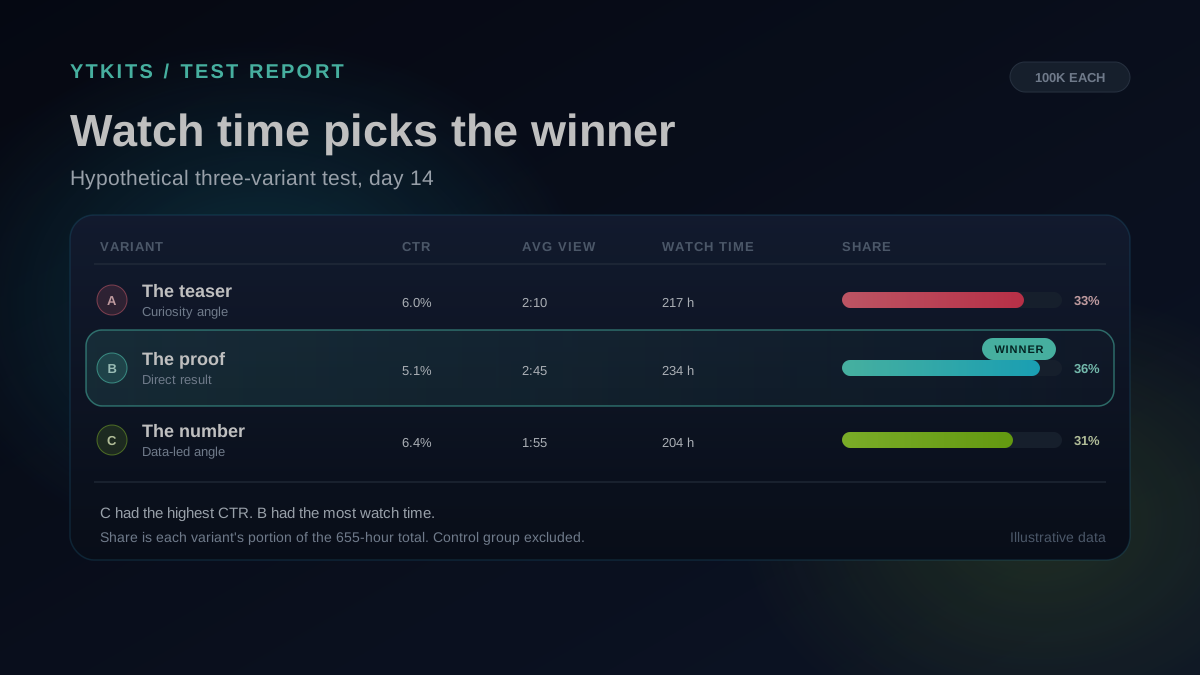
The example below is hypothetical. I chose round numbers so you can check the arithmetic. It assumes each variant received 100,000 impressions over the same period.
| Variant | Impressions | CTR | Views | Avg view duration | Watch time | Share of watch time |
|---|---|---|---|---|---|---|
| A | 100,000 | 6.0% | 6,000 | 2:10 (130s) | 780,000s (217h) | 33.1% |
| B | 100,000 | 5.1% | 5,100 | 2:45 (165s) | 841,500s (234h) | 35.7% |
| C | 100,000 | 6.4% | 6,400 | 1:55 (115s) | 736,000s (204h) | 31.2% |
The math for each row is views multiplied by average view duration. For variant B: 5,100 x 165 = 841,500 seconds, or about 234 hours. Divide each watch time by the 654.9-hour total to get the share.
Variant C won the click with a 6.4% CTR. Variant B won the test with the lowest CTR, because its viewers watched longer. Variant A had more views than B and less watch time.
How to set up a test that can produce a winner
This is the routine I use now. It is not a guarantee of a winner, but it removes the self-inflicted reasons a test fails.
- Pick a video with steady traffic. An older evergreen upload is better than a fresh one. Check impressions for the last 28 days before you commit.
- Run the sample-size sanity check. Use the table above. If the video cannot generate enough impressions in two weeks, choose a different video.
- Start with two variants. Use the third slot only when you have the traffic to support it.
- Change one idea. Competing headlines, a different subject, a different crop, or a different emotional angle are real tests. A slight color shift is not.
- Make the difference obvious. A test with no clear difference runs longer. Give the algorithm something to separate.
- Upload at 1280 x 720 or higher. One low-resolution file can downscale every variant in the test.
- Freeze the title and thumbnail for the whole test. Do not fix a typo in the title or swap the thumbnail, even briefly.
- Upload your preferred default first. If the result is inconclusive, YouTube keeps the first option you uploaded. Order matters.
Here is a simple worksheet I keep for each test:
| Field | What to record |
|---|---|
| Video and publish date | So you can compare like with like |
| Impressions in the last 28 days | Your traffic reality check |
| Variants tested | Title, thumbnail, or both |
| The one idea being tested | Example: curiosity gap vs. direct result |
| Start and planned end date | Two weeks maximum |
| Pre-committed decision | What you will do if the result is a winner, a tie, or inconclusive |
| Result and date | Winner, performed same, or inconclusive |
| Next action | Keep, revert, retest with a bigger change, or move on |
What to do with each result
If you get a winner: YouTube applies it to all viewers. Leave it alone for a while. Changing it immediately starts a new chapter with no comparison. Use the Compare Videos tool later if you want to compare the video's performance with an older upload, and keep in mind that the test only measured packaging.
If you get "Performed Same": Keep the default. This result usually means the packaging was not the constraint. Test a different element, such as the hook or the topic, or accept that this video is already doing what it can.
If you get "Inconclusive": The test lacked evidence. That does not mean the thumbnail was bad. Do not rerun the same variants. Move to a video with more impressions or make a bolder change. If you already ran three similar variants, cut to two clearly different ones.
If the test stops early: Check whether you edited the title or thumbnail, whether the video is eligible, and whether it got enough impressions. Restart only after fixing the actual cause.
What the test cannot tell you
A thumbnail test answers one narrow question: which packaging produced more watch time among the viewers who saw it. It does not tell you whether the video is good, whether the topic has staying power, or whether revenue will rise.
Revenue depends on more than views. RPM moves with geography, ad demand, video length, and ad suitability. A packaging change can bring in more viewers from lower-RPM regions or attract an audience that skips ads. If your goal is revenue, use the Revenue Estimator to model scenarios and the Video Data Inspector to check the video's public numbers. Treat the thumbnail test as one input, not a revenue forecast.
Third-party tests can also disagree with YouTube. YouTube's tests are concurrent, meaning all variants are shown at the same time. Many third-party tools run tests one after another and optimize for CTR. Different method, different winner. Both results can be real because they answer different questions.
Quick answers
Why is A/B testing not showing in YouTube Studio?
Check four things. You need Studio on a computer, because the feature is desktop only. Advanced features must be enabled. The video must be a regular long-form upload, not a Short, private video, made-for-kids video, age-restricted video, scheduled Live, or unfinished Premiere. Live archives and converted Premieres are eligible.
Why did my test stop early?
The usual cause is an edit to the title or thumbnail, which stops the test automatically. Check that the video's audience settings did not change either. Restart only after you fix the cause, and leave the packaging alone this time.
Can I A/B test a YouTube Short?
No. A/B testing is not available for Shorts. YouTube also says that once a video transitions into a Short, you lose access to any earlier tests on that video. Read my thumbnail workflow for ideas you can test on long-form uploads.
Does the winning thumbnail increase revenue?
Not directly. It can increase views and watch time, which can lead to more ad opportunities. Revenue still depends on RPM, geography, ad demand, and ad suitability. Use the Revenue Estimator to test the money side separately. You can also read why RPM and CPM move differently.
A quick pre-flight checklist
- The video is long-form, public, not made for kids, and not age-restricted.
- Advanced features are enabled, and you are using Studio on a computer.
- The video has enough impressions to finish the test in two weeks.
- You are testing two clearly different variants.
- Both thumbnails are at least 1280 x 720.
- Your preferred default is uploaded first.
- You will not touch the title or thumbnail until the test ends.
- You have written down what you will do with each result.
If your last test was inconclusive, that is useful information about traffic and test design. Pick a busier video, make a bolder change, and give the test enough impressions to answer the question.
Sources and further reading
- A/B test titles and thumbnails (YouTube Help)
- Check your YouTube thumbnail impressions and watch time (YouTube Help)
- Impressions and click-through rate FAQs (YouTube Help)
- Custom thumbnail best practices (YouTube Help)
- Unlock advanced features (YouTube Help)
- Understand your video reach (YouTube Help)