

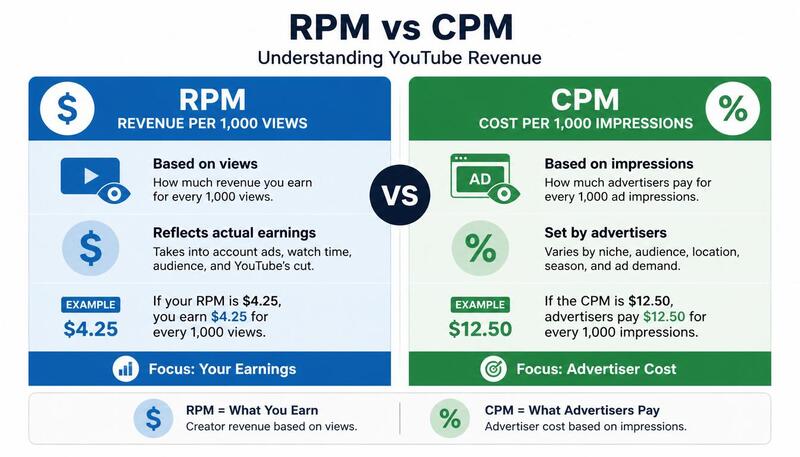
RPM and CPM appear beside each other in YouTube Analytics, but they answer different questions. Confusing them made my early revenue analysis less useful because I was comparing an advertiser-side rate with a creator-side result.
This article explains how I read both metrics on my Indian gaming channel. The screenshots come from my channel, but the values should not be used as benchmarks for another creator.
CPM describes advertiser spending
CPM is the cost an advertiser pays for 1,000 ad impressions before YouTube's revenue share. YouTube Studio also reports playback-based CPM, which is based on 1,000 video playbacks where one or more ads appeared.

The important point is that CPM is not the amount deposited into the creator's account. It is calculated on an advertising basis and does not include every public video view.
RPM describes creator revenue per 1,000 views
RPM is the creator's revenue per 1,000 views after YouTube's revenue share. Depending on the report, it can reflect multiple YouTube revenue sources, while the denominator includes views that did not show an ad.

That is why RPM is normally lower than CPM. The rates have different numerators, denominators and positions in the revenue process.
YouTube's official RPM and CPM explanation provides the current definitions.
How I use each metric
I use RPM when reviewing what my channel earned relative to its views. It helps with questions such as:
- How did revenue per 1,000 views change between comparable periods?
- Did a change in format or audience mix coincide with a different creator-side result?
- What RPM should I use in a planning scenario based on my own history?
I use CPM as context about the advertising side. A change can reflect advertiser demand, geography, season and which views became monetized playbacks. I do not treat a CPM increase as an equal increase in take-home revenue.
A simple example
Imagine a video with 100,000 views and an RPM of $0.60.
100,000 ÷ 1,000 × $0.60 = $60
The $60 calculation uses RPM. Applying a displayed CPM to all 100,000 views would be misleading because not every view is an ad impression or monetized playback, and CPM is measured before the creator revenue share.
What affected my interpretation
On my gaming channel, most viewers were in India and nearby markets. My reported values therefore describe that audience and the periods shown in Studio. They should not be compared directly with a channel serving a different country, topic or format.
When a value changed, I checked:
- Audience geography
- Long-form versus Shorts mix
- Video length and mid-roll eligibility
- Advertiser-friendly status
- Time of year
- Traffic source and viewer intent
- Whether I was comparing the same date range
These checks do not prove causation. They prevent me from crediting one change when the audience or reporting period also changed.
Why I removed category benchmark tables from this guide
Earlier versions included estimated RPM ranges for several niches. Those figures distracted from the definitions and were repeated elsewhere on YTKits. A category label alone cannot predict a creator's RPM, and a table assembled from mixed public reports can look more authoritative than its evidence supports.
This article now stays focused on metrics I can define from YouTube documentation and describe from my own channel context.
Can a creator increase RPM directly?
RPM is an outcome rather than a switch. I cannot set the market's advertising rate. I can make decisions that may change the mix of revenue and views, such as creating content viewers find useful, keeping eligible videos advertiser-friendly and selecting formats that suit the topic.
Longer videos may be eligible for mid-roll ads, but padding a video can reduce viewer satisfaction. Reaching viewers in another country cannot be achieved reliably by changing an upload location or using a VPN. The content must actually serve that audience.
Common interpretation mistakes
Treating CPM as creator earnings
CPM is not multiplied by every view to calculate take-home revenue.
Comparing unrelated channels
A finance channel serving US viewers and a Hindi gaming channel do not provide a controlled comparison.
Reading a short spike as a permanent rate
Advertising demand and audience mix change. I compare consistent periods and look at the surrounding reports.
Using a public calculator as proof
A calculator can model views multiplied by an assumed RPM. It cannot see another channel's Studio data.
Evidence and limitations
The Studio screenshots in this article are presented as examples from my channel. They do not establish an industry average. I have not published the channel identity, which limits outside verification, so I keep conclusions specific to the displayed context.
For your own channel, use the revenue reports inside YouTube Studio. For planning, the YTKits revenue calculator lets you enter an RPM assumption and see a range, but its output is a scenario rather than verified earnings.
A reconciliation worksheet
When CPM and RPM move in different directions, I write down the following before drawing a conclusion:
| Question | Where to check |
|---|---|
| Did the reporting period change? | Studio date range |
| Did the format mix change? | Long-form versus Shorts views |
| Did the audience geography change? | Audience tab |
| Did ad suitability change? | Video monetization status |
| Did monetized playbacks change? | Revenue report |
| Did seasonality change? | Compare the same months year over year |
If I cannot answer those questions, I do not claim that one metric caused the other.
Sources and last check
I checked the definitions on October 30, 2026. The interpretations are based on my own channel context; the metric definitions come from YouTube.
- Understand ad revenue analytics: official CPM and RPM definitions
- Get started with YouTube Analytics: revenue reports and date ranges
- Advertiser-friendly content guidelines: why ad suitability can change CPM
- YouTube Shorts monetization policies: why Shorts revenue follows a different system