


The first time I tried to change my YouTube username, I made a mess of it.
I edited the name on my Google Account, refreshed my channel page, and… nothing happened. My channel still had the old name. That's when I learned the annoying truth: YouTube doesn't really have a "username" anymore, and the name you see on your channel is controlled in a completely different place.
Since then I've changed both a channel name and a handle on my own gaming channel. The actual click-through took less than a minute. Updating every bio, end screen and pinned comment that pointed at the old handle took the better part of a week.
This guide is the process I wish I'd had the first time. It covers the three different names people mean when they say "YouTube username," the official 14-day limits, what happens to your URL, and what to do when YouTube refuses the change.
Quick answer: YouTube has three different names
Most tutorials skip one thing. "YouTube username" can mean any of these:
| What you probably mean | Where it shows up | Where to change it |
|---|---|---|
| Channel name (display name) | Under your videos, on your channel page, in search | YouTube Studio → Customization → Profile → Name |
Handle (@yourname) |
Comments, mentions, Shorts, and your youtube.com/@yourname URL |
YouTube Studio → Customization → Profile → Handle |
| Google Account name | Gmail, Google Photos, account menus, not your public channel | Google Account personal info |
If you change the Google Account name, your YouTube channel name does not change. That was my first mistake.
If you want the short version: open YouTube Studio on desktop, go to Customization → Profile, edit the name or handle, then click Publish. On mobile, the paths are below. But before you touch anything, read the section on the 14-day limits, because you only get two name changes and two handle changes in a 14-day window.
What "username" actually means on YouTube now
YouTube used to have usernames and custom URLs like youtube.com/c/YourName. In 2022, YouTube introduced handles, the @ names you now see in comments and channel URLs.
A few details that matter:
- Your handle is unique. No two channels can have the same one.
- Your channel name is not unique. Plenty of channels can share a display name, as long as they aren't impersonating someone.
- Your handle is your channel URL. If your handle is
@jayedit, your channel lives atyoutube.com/@jayedit. - Handles are not case-sensitive.
@JayEditand@jayeditare the same handle. - Legacy custom URLs still work. If you have an older personalized URL, YouTube says it will continue to work. You don't get to create a new custom URL anymore; handles replaced that system.
So when someone asks how to change their YouTube username, the honest answer is: decide whether you mean the display name or the handle, because they're separate settings with separate rules.
Before you change anything: a 7-point check
This is the part I skipped, and it cost me a bunch of broken links. Do these first.
- Decide which name is actually wrong. If your videos show the old name, that's the channel name. If your
@mentionand URL are wrong, that's the handle. If your Gmail profile is wrong, that's your Google Account. - Check whether your ideal handle is available. Open an incognito window and visit
youtube.com/@thehandle. You can also run it through the YTKits Username Checker. One caveat: that tool can only confirm whether a public channel page exists. A missing page isn't a 100% guarantee the handle is free, and results can be cached for about an hour. YouTube Studio is the final authority. - Copy your current channel URL somewhere safe. You'll want it for comparison after the change.
- Make a list of every place your old handle appears. Social bios, website links, video descriptions, end screens, channel watermarks, pinned comments, email signatures, business cards, QR codes, affiliate links. This list is your weekend homework.
- Check your verification badge. YouTube says changing your channel name removes your verification badge. If you're verified and the badge matters for a launch or sponsorship, plan around that.
- Check for channel name translations. If you've added translated channel names, YouTube says to delete them before changing the main name. This is the fix for one of the most common "YouTube won't let me change my name" errors.
- Pick a quiet week. Name changes can take a few days to appear everywhere, and you only get two changes per 14 days. Don't rebrand the night before a big upload.
How to change your YouTube channel name on desktop
This is the official desktop flow as of October 2026:
- Sign in to YouTube Studio.
- In the left menu, click Customization.
- Open the Profile tab. (Older tutorials say Basic info. YouTube has renamed this section, so don't panic if your screen looks slightly different.)
- Find your channel Name and click Edit.
- Type the new name and confirm.
- Click Publish.
That's it. YouTube notes that the new name may take a few days to update and display across the platform. It also notes that changing your channel name and picture only affects YouTube. It does not change your Google Account name or photo.
If you have a verification badge, expect it to disappear after the name change. That's documented behavior, not a bug.
How to change your YouTube name on your phone
You can do this in the regular YouTube app or the YouTube Studio app. Both are official; use whichever is already installed.
In the YouTube app (Android)
- Tap your profile picture.
- Tap View channel at the top.
- Next to your name, tap Edit.
- Enter the new channel name.
- Tap Save.
In the YouTube Studio app (Android)
- Tap your profile picture.
- Tap Edit.
- Next to your name or description, tap Edit.
- Enter the new name and tap Save.
The iPhone and iPad flows follow the same pattern, though button labels can vary slightly by app version. If you can't find the option, update the app or use the desktop version of Studio. The desktop version is also better for checking how the name looks next to your banner and profile picture.
How to change your YouTube handle
Your handle is the part that changes your channel URL, so treat this as a mini website migration rather than a profile tweak.
- Sign in to YouTube Studio.
- Go to Customization → Profile.
- Under Handle, click Edit.
- Type the new handle. YouTube will show whether it's available and may suggest alternatives.
- Click Publish to confirm.
The rules YouTube publishes for handles:
- 3-30 characters (shorter limits apply to some scripts)
- Letters and numbers from supported languages
- Underscores, hyphens, periods and middle dots are allowed, but not at the start or end
- Not URL-like or phone-number-like
- Not already in use
- Must follow YouTube's Community Guidelines
YouTube also says handles can't be sold or transferred. So if someone offers to sell you a handle, that's a policy violation, not a shortcut.
What happens to your old handle URL
This is the detail that saves you from broken links.
When you change your handle, YouTube holds your previous handle for 14 days. During that window, both the old and new URLs work. After 14 days, the old handle can be claimed by someone else.
That gives you a two-week redirect window. Use it. Update your website, social profiles, video descriptions and email signature immediately, not on day 13. If you change your handle twice inside 14 days, the previous handle is held for 14 days as well, so you can switch back if you made a mistake.
One more thing: handles are limited to two changes in 14 days. The channel name has the same two changes in 14 days limit. They're separate settings, but if you're planning a full rebrand, assume you have very little room for trial and error.
How to change your Google Account name
If you actually want your name changed in Gmail, Google Photos and other Google services:
- Go to Google Account personal info.
- Click Name and edit it.
- Save the change.
This will not rename your YouTube channel. YouTube's help is explicit that changing your Google Account name and picture doesn't change your channel name. If your channel was created under a Brand Account, your channel name and your personal Google Account name are even more clearly separate.
If your channel belongs to a Brand Account
Brand Accounts are common for business channels and channels managed by more than one person. If your channel lives under one:
- Make sure you're signed into the account that actually manages the channel.
- Use the profile menu to Switch account if you can't see the channel.
- Then follow the same Customization → Profile steps in YouTube Studio.
If the name won't save and you're a manager rather than the owner, permissions may be the reason. Ask the owner to check your channel access. Also check that you're not editing a personal channel that happens to be signed in on the same browser.
What changes and what doesn't
Here's the table I wish existed before my first rename:
| Item | Does it change? | Notes |
|---|---|---|
| Your videos and their URLs | No | Video URLs use video IDs, not your handle |
| Subscribers | No | They stay attached to the channel |
| Comments and watch history | No | Tied to the channel, though future @mentions use the new handle |
| Channel name across YouTube | Yes, gradually | Can take a few days to update |
| Handle and channel URL | Yes | Old handle works for 14 days, then may be released |
| Legacy custom URL | No | YouTube says existing personalized URLs continue to work |
| Google Account name | No | Separate setting |
| Verification badge | Removed on a name change | You may need to re-verify |
| Monetization / YPP status | Not automatically lost | Your channel and videos remain the same, but review current policies |
| Google Search results | Eventually | Search engines need time to recrawl |
| External links using the old handle | Break after 14 days | Update them during the hold window |
Common errors and how to fix them
"You can't change your name right now"
You've probably hit the two changes in 14 days limit. Wait out the window. There's no legitimate trick to bypass it.
The name won't save and you have translations
Delete your channel name translations first, then try the main name again. YouTube specifically calls this out as a reason a name update can fail.
"This handle isn't available"
Another channel has it, or it breaks the naming rules. Try adding a period, underscore or a meaningful word. Don't copy another creator's name or handle to get around availability. Impersonation can get your channel penalized.
The new name isn't showing everywhere
Give it a few days and force-refresh. YouTube says name changes can take time to display across the platform. Check in an incognito window before assuming the change failed.
My verification badge disappeared
That's expected after a channel name change, according to YouTube's documentation. Re-check the current verification requirements and reapply if you're eligible.
I changed the wrong channel
Use the account switcher in the top-right corner. If you manage multiple channels or Brand Accounts, it's easy to edit the wrong one. Compare the channel URL before and after.
My old links stopped working after two weeks
The 14-day handle hold has expired. Update the links to the new URL and, where possible, add a redirect on your own website. YouTube won't redirect the old handle forever.
The name was rejected or reverted
Names and handles still have to follow YouTube's Community Guidelines. Offensive, spammy or impersonating names can be removed. Fix the name rather than resubmitting the same one.
Choosing a name that survives the rebrand
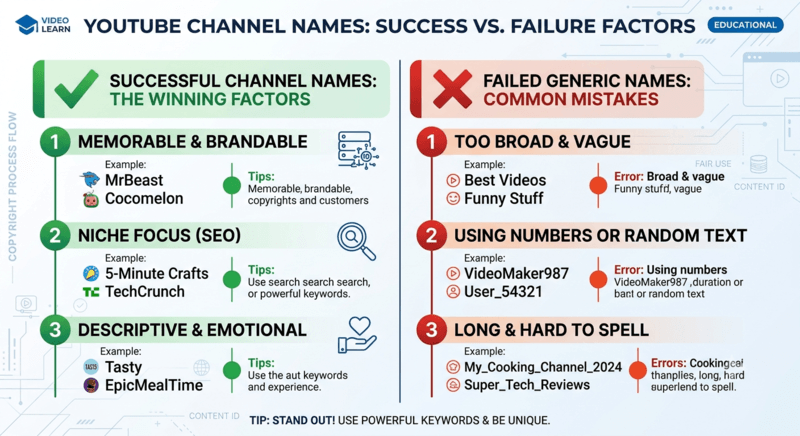 Illustrative name patterns. Treat these as prompts, not rules that guarantee growth.
A name change is a branding decision, not an SEO trick. I've seen creators stuff keywords into a channel name and then wonder why nobody remembers it. A better test is simple: can someone hear it once, spell it correctly, and find you?
I use six checks now:
- Say it out loud. If you have to explain the spelling every time, it's a bad handle.
- Check the handle before you fall in love with the name. The display name can be duplicated; the handle can't.
- Leave room to grow. A name that locks you into one game or one format gets awkward when your content changes.
- Avoid trademark trouble. Don't build a channel name around a brand you don't own.
- Match your other platforms where possible. Consistency makes you easier to find.
- Search for it first. A quick search can save you from accidentally picking a name already tied to a controversial creator or company.
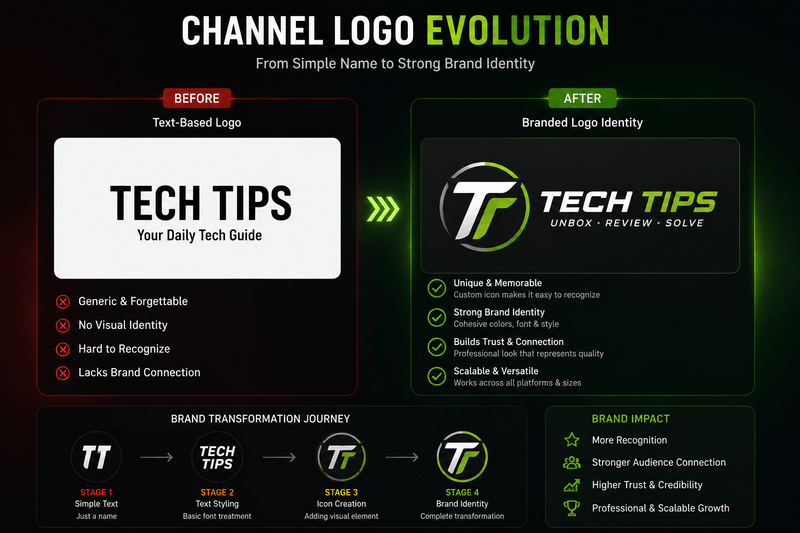 Your channel name, handle and logo should feel like one identity, not three unrelated decisions.
And keep the logo in mind. If your channel name changes, your profile picture and watermark may still contain the old initials. That's not a YouTube error; it's just a rebrand you haven't finished yet.
A safe rebrand sequence
If I were changing a channel name and handle today, I'd do it in this order:
- Day 0: Check handle availability, back up your channel URL, and write down every place the old handle appears.
- Day 0: Prepare the new logo, banner text, watermark and social bios.
- Change the handle first. That starts the 14-day window where the old URL still works.
- Change the channel name and Publish. Do both changes in the same session if you're sure.
- Immediately update external links. Website, social profiles, video descriptions, pinned comments, email signature.
- Post a short community update. Tell subscribers why the name changed and what stayed the same.
- Check the channel in incognito after 48 hours and again after 14 days. That's when caching and the handle hold expire.
I like changing the handle first because it gives you the redirect window while you update everything else. Changing the display name first doesn't give you that safety net.
Does a name change hurt views or monetization?
A channel name isn't a ranking field, so there's no direct "new name = more views" switch. What can change is recognition. If your subscribers see an unfamiliar name next to a familiar thumbnail, click behavior can dip for a few uploads. That's a branding effect, not a penalty.
Monetization isn't automatically lost because you renamed a channel. Your videos, subscribers and watch history stay with the channel. That said, YouTube Partner Program rules and verification requirements do change over time, so check the current monetization requirements instead of relying on an old blog post.
My advice: change the name, then watch your analytics for 28 days before deciding whether it worked. Don't stack a rename on top of a format change and then blame the name for everything. If you want a structured way to read the data, my YouTube Analytics routine covers the metrics I check first.
Frequently asked questions
Can I change my YouTube username without changing my URL?
Yes. The channel name and the handle are separate. Changing the display name does not change your @handle or channel URL. Changing the handle does change the URL.
How many times can I change my YouTube name?
YouTube says twice within a 14-day period. The same limit applies to handles. Plan the change instead of treating it as unlimited.
Can I change my handle back to the old one?
Usually yes, within the 14-day hold window, as long as you have changes left in your 14-day limit. After the hold expires, the old handle may be claimed by someone else.
Does changing my channel name affect my subscribers or videos?
No. Subscribers, videos and watch history stay on the channel. The public name and handle are what change.
Will changing my name remove my verification badge?
YouTube says a channel name change removes the verification badge. Check the current requirements and reapply if you're eligible.
Can I buy a YouTube handle from someone?
No. YouTube prohibits the sale and transfer of handles. A handle being "for sale" is a red flag, not a legitimate transaction.
Why does my old name still show in comments or search?
Name changes can take a few days to propagate, and search engines need time to recrawl. Clear your cache and check again in an incognito window. If the old handle is in a comment you wrote, edit the comment or mention manually.
Does changing my channel name change my Gmail name?
No. Your Gmail name comes from your Google Account. Change it separately at myaccount.google.com/personal-info.
Can I change my YouTube name on my phone?
Yes. In the YouTube app, tap your profile picture → View channel → Edit next to your name. In the YouTube Studio app, tap your profile picture → Edit. Both are official paths.
Sources and last check
I verified the steps and limits in this guide against YouTube's official help pages on October 21, 2026. YouTube changes its Studio interface regularly, so confirm the current labels in your own account before publishing a change.
- Manage your YouTube channel's profile (desktop)
- Manage your YouTube channel's profile (Android)
- Change, view, or hide your handle
- Learn about YouTube handles
- YouTube Community Guidelines
- Google Account personal info
One last piece of advice from someone who learned it the hard way: write down the old name, the new name and the date you changed them. When something looks broken two weeks later, that note will save you an hour of confused clicking.