

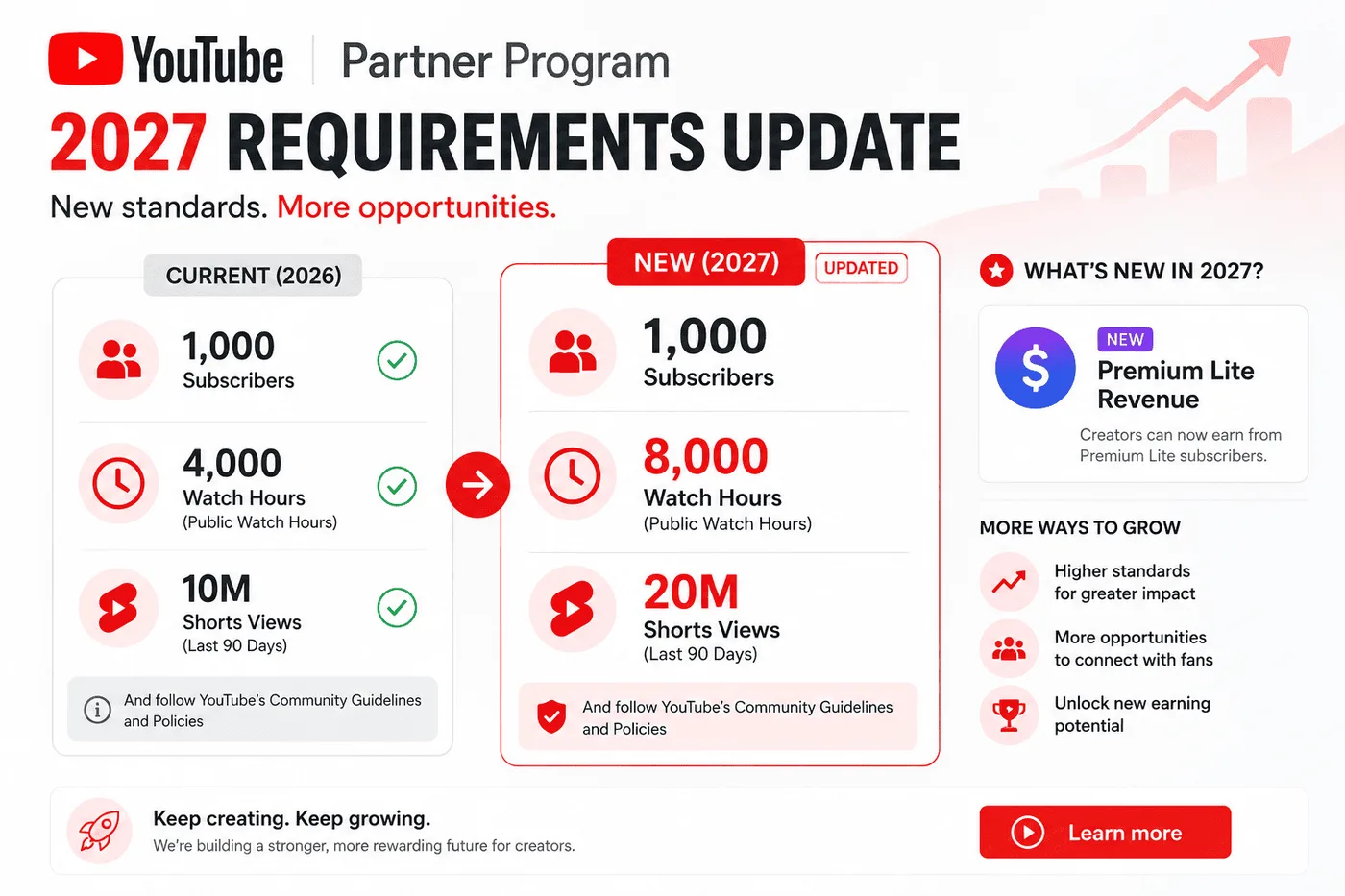
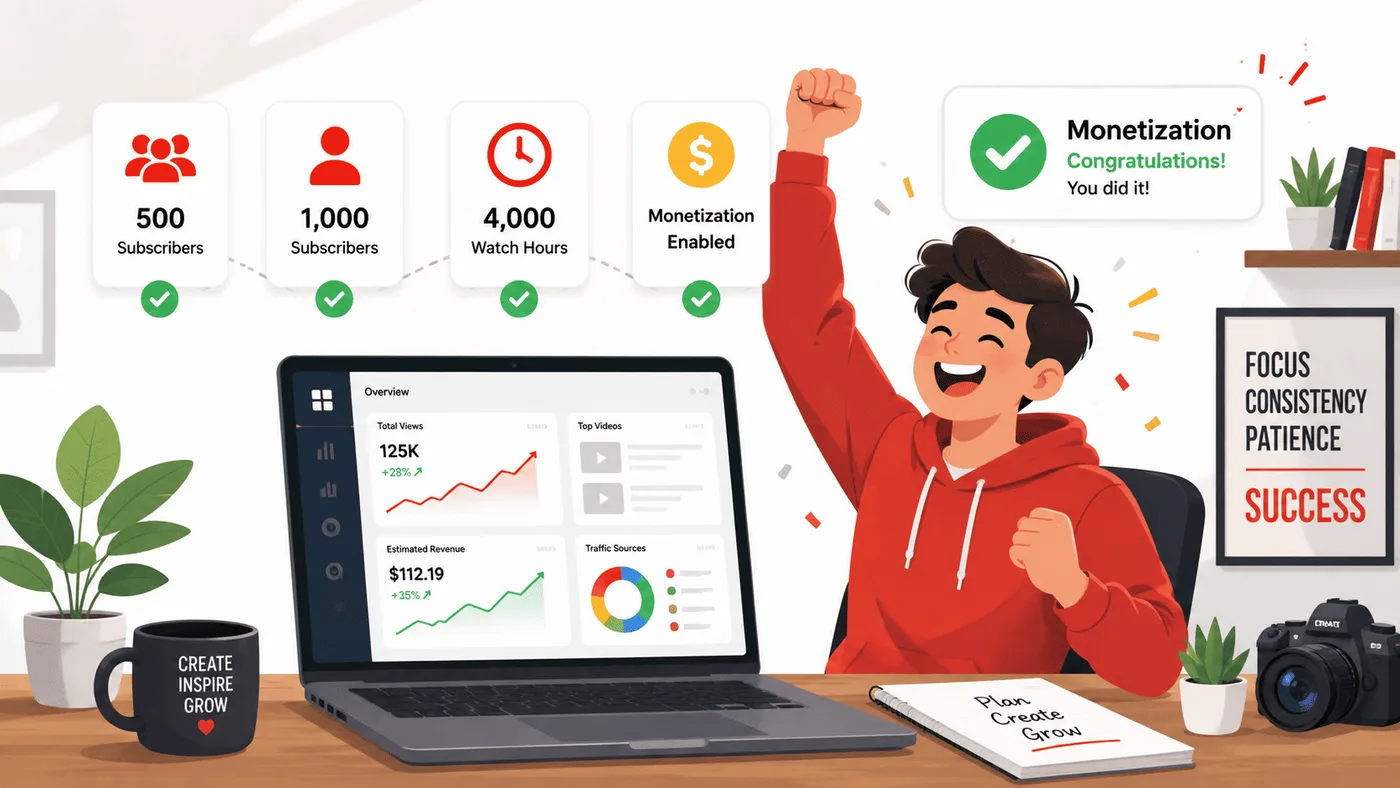
Policy update, verified October 30, 2026: YouTube says changes take effect on February 1, 2027. New applicants seeking ads and Premium revenue will need 8,000 qualified watch hours in 365 days or 20 million qualified Shorts views in 90 days, plus 1,000 subscribers. Existing YPP members are not removed for being below the new entry thresholds. Read YouTube's official update and confirm the requirements shown in your own YouTube Studio before acting.
The day I finally became eligible for YouTube monetization, I thought I'd reached the finish line.
After spending years growing my gaming channel, hitting the requirements felt like the moment everything would finally change.
Then my first month's revenue arrived.
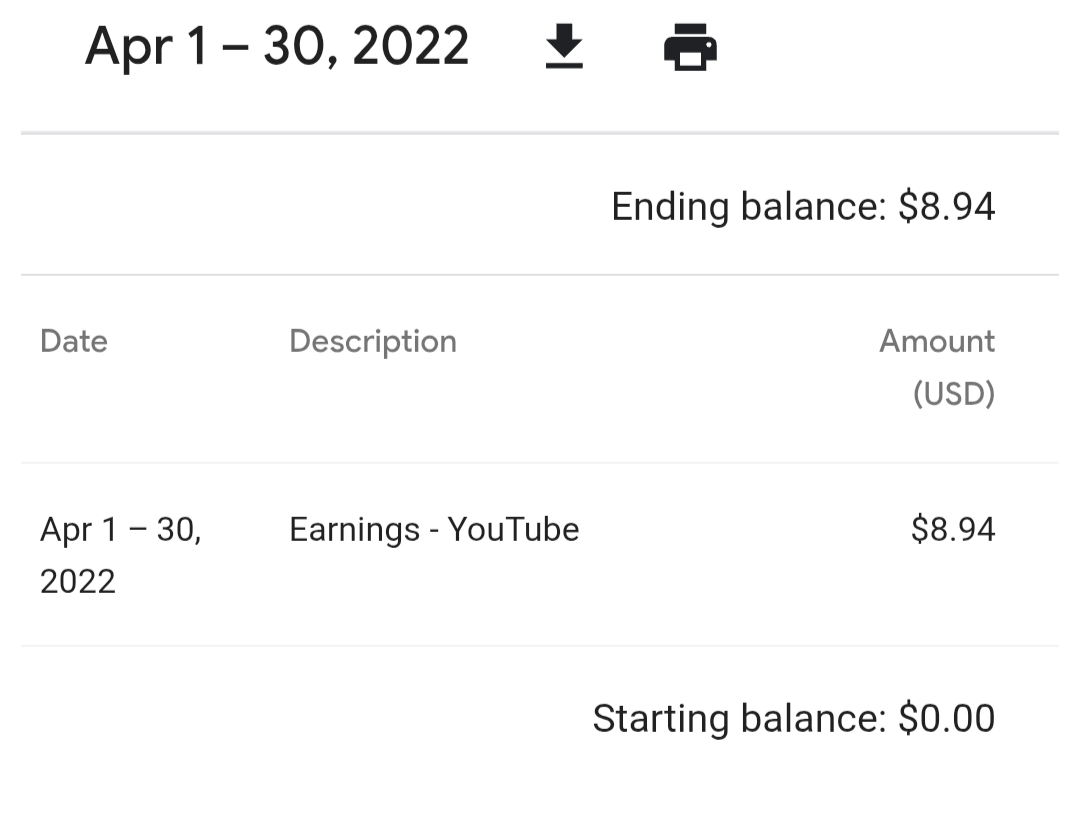
It was $8.94.
Not hundreds of dollars.
Not enough to celebrate with a fancy dinner.
Just enough to make me realize I'd misunderstood what YouTube monetization actually meant.
Over the next three months, I slowly crossed Google's $100 payment threshold, earned my first payout, and learned that getting monetized is only the beginning of the journey, not the end of it.
I've been on YouTube for over 5 years now, and that early monetization experience is exactly what pushed me to build tools like the YTKits Monetization Checker, where I wanted creators to understand the monetization process before they reached it, instead of learning everything the hard way like I did.
If you're working toward YouTube monetization, or you've just crossed the requirements, this guide combines my own experience with YouTube's official Partner Program documentation to explain what actually happens, what gets channels rejected, how payments work, and what you should realistically expect after getting approved.
Key takeaway: Getting accepted into the YouTube Partner Program isn't the finish line. It's simply the point where your channel becomes eligible to start earning. For most creators, including me, the real challenge begins after monetization.
The Two YouTube Monetization Milestones

One of the biggest misconceptions I see is that YouTube has only one monetization requirement.
It doesn't.
Today there are two different levels of the YouTube Partner Program.
The first lets smaller creators unlock fan-funding features.
The second unlocks advertising revenue.
Many articles still only explain the second milestone, which confuses creators who hear people talking about "500-subscriber monetization."
| Feature | Early YPP (Fan Funding) | Full YPP (Current) | Full YPP (Starting Feb 1, 2027)* |
|---|---|---|---|
| Subscribers | 500 | 1,000 | 1,000 |
| Public uploads | 3 in 90 days | 3 in 90 days | 3 in 90 days |
| Watch Hours | 3,000 (365 days) | 4,000 (365 days) | 8,000 (365 days) |
| OR Shorts Views | 3 Million (90 days) | 10 Million (90 days) | 20 Million (90 days) |
| Super Thanks | Yes | Yes | Yes |
| Super Chat | Yes | Yes | Yes |
| Memberships | Yes | Yes | Yes |
| Shopping | Yes | Yes | Yes |
| Ad Revenue | No | Yes | Yes |
*Note: The 2027 threshold increases apply only to new channel applications. Existing YPP members keep their status, but YouTube says they must accept the updated terms in YouTube Studio by January 31, 2027 to keep earning from the affected monetization features.
The important thing to understand is that 500 subscribers does not unlock YouTube ad revenue.
Instead, it gives eligible creators access to fan-funding features like Super Thanks, Super Chat, Channel Memberships, and certain Shopping features.
To earn advertising revenue from your videos, you'll still need to qualify for the full YouTube Partner Program requirements.
When I became monetized, this earlier 500-subscriber tier didn't exist.
If I were starting today, I'd treat it as an encouraging milestone rather than the final goal.
It's a sign that your channel is progressing, but advertising revenue still comes later.
The Full YouTube Monetization Requirements

To qualify for YouTube advertising revenue, you must meet the full eligibility requirements for the YouTube Partner Program (YPP).
At the time of writing, YouTube requires creators to meet subscriber and watch-time (or Shorts view) thresholds, follow its monetization policies, and have a channel in good standing before advertising revenue can be enabled.
In practice, that means:
1. Reach 1,000 Subscribers
The first requirement is straightforward.
Your channel needs at least 1,000 subscribers before you can unlock advertising revenue through the YouTube Partner Program.
Those subscribers must be genuine.
Artificial growth methods such as buying subscribers, participating in "sub4sub" groups, or using engagement services violate YouTube's policies and can result in removed subscribers, suspension from the YouTube Partner Program, or even channel termination.
When I was working toward monetization, subscriber count felt like the hardest milestone.
Looking back, I actually think it was the easiest one.
Building enough watch time consistently turned out to be a much bigger challenge.
2. Reach the Watch-Time (or Shorts) Requirement
After reaching 1,000 subscribers, you'll also need to qualify through one of these two paths:
- 4,000 valid public watch hours from long-form videos within the previous 12 months, or
- 10 million valid public Shorts views within the previous 90 days.
Most creators I know, including myself, focused on the watch-hours route because long-form videos generally have much stronger earning potential after monetization.
Shorts can be excellent for reaching new audiences, but they follow a completely different monetization path.
3. Live in an Eligible Country
The YouTube Partner Program isn't available everywhere.
Your country or region must support the YouTube Partner Program before your channel can apply for monetization.
If you're unsure, always check YouTube's official list of eligible countries because availability occasionally changes.
4. Link an AdSense for YouTube Account
You'll also need to connect an AdSense for YouTube account.
This is where Google sends your finalized YouTube earnings before paying them to your bank account.
During setup you'll normally need to:
- Verify your identity
- Provide tax information where required
- Add a payment method
- Complete any required verification steps
Don't worry too much about this during the early stages.
The process is guided step-by-step inside YouTube Studio once you're eligible to apply.
5. Enable Two-Step Verification
One requirement that many creators overlook is two-step verification.
Google requires creators joining the YouTube Partner Program to have two-step verification enabled on their Google Account.
It only takes a few minutes to set up, but forgetting it can delay your application.
6. Keep Your Channel in Good Standing
Meeting the subscriber and watch-hour requirements doesn't automatically guarantee approval.
Your channel also needs to follow YouTube's policies.
That includes:
- Community Guidelines
- Copyright rules
- Advertiser-Friendly Content Guidelines
- YouTube's Terms of Service
If your channel has active Community Guidelines strikes or serious policy violations, you'll usually need to resolve those issues before applying.
Quick Summary
Meeting the subscriber and watch-hour thresholds is only one part of YouTube monetization. Your channel must also follow YouTube's policies, be located in an eligible country, use an AdSense account, and remain in good standing throughout the review process.
Major YPP Updates Announced for 2027 (What Every Creator Must Know)
YouTube has published three main YPP updates: Premium Lite expansion, new Shorts earning rules, and higher entry thresholds. YouTube says the changes reflect how viewers watch today and are meant to keep the program sustainable for creators.
These changes officially take effect on February 1, 2027. Here is what the official update says, how it affects your channel, and how to prepare.
1. Doubled Entry Thresholds for New Creators
If you haven't yet joined the YouTube Partner Program for ad revenue, the bar is getting significantly higher:
- Watch hours: Increases from 4,000 to 8,000 qualified public watch hours in the past 12 months.
- Shorts views: Increases from 10 million to 20 million qualified Shorts views in the past 90 days.
- Subscribers: Remains at 1,000 subscribers.
What this means for you:
If your goal is ad revenue and you are close to the current threshold, applying before February 1, 2027 can be worth it. YouTube says creators already in YPP will not lose their status because of the new entry thresholds. They will still need to accept the updated terms in YouTube Studio by January 31, 2027.
The entry criteria for the 500-subscriber Fan Funding tier (Super Thanks, Memberships, Shopping) stay at 3,000 qualified watch hours or 3 million qualified Shorts views. YouTube says there are no changes to fan funding, Creator Partnerships, or Shopping eligibility.
2. The 10 Million Shorts View Maintenance Threshold & New Incentives
Previously, once a channel qualified for YPP through Shorts (or long-form), it retained Shorts ad revenue share indefinitely as long as it stayed in good standing.
Starting February 1, 2027, YouTube is introducing an ongoing performance check for Shorts ad revenue:
- 10M Shorts views requirement: To earn from the Shorts Creator Pool and Premium revenue in a given month, creators must have at least 10 million qualified Shorts views in the last 90 days.
- What happens if you dip below 10M? YouTube says you do not lose YPP status, and your long-form earnings are not affected. You stop earning from the Shorts Creator Pool until you meet the threshold again. Confirm the current status in YouTube Studio rather than assuming the pause and restart timing.
- New Shorts incentive programs: YouTube says it may offer bonuses for YouTube Shopping, production credits for brand deals, and earnings boosts for cultural trend activations. Eligible creators will get direct notifications with opt-in instructions when those programs launch. The wording matters: these are separate opportunities, not a guaranteed replacement for Shorts ad revenue.
3. Global Expansion of Premium Lite & Creator Revenue Pools
YouTube Premium Lite, a lower-cost subscription with ad-free viewing and no bundled YouTube Music, is expanding to all countries where standard Premium is available.
The official revenue details are narrower than some social posts suggest:
- Premium Lite pool: Creators share in a pool representing 60% of net Premium Lite subscription revenue.
- Standard Premium pool: For Premium views, creators share in a pool representing 30% of net subscription revenue.
- Where it appears: YouTube says Premium Lite earnings are included in your standard YouTube Premium metrics in Analytics.
- What YouTube does not publish: a simple per-view Premium Lite rate. Your payout depends on your share of subscription viewing, so do not multiply views by a fixed RPM and call it a forecast.
YouTube also says that, on average, creators earn more per user from Premium than from ads, based on 2026 performance. That is an average across the platform, not a promise for your channel. This is why a Premium Lite subscriber can be worth more than an ad-supported viewer without guaranteeing a specific RPM increase.
What Actually Counts Toward the 4,000 Watch Hours?
One of the biggest surprises for new creators isn't how to gain watch hours.
It's discovering that not every minute watched actually counts.
When I was learning about YouTube monetization, I assumed every view would move me closer to the threshold.
That's not how it works.
Only specific types of watch time are eligible.
| Counts | Doesn't Count |
|---|---|
| Public long-form videos | Private videos |
| Public live streams (after they become public VODs, if eligible) | Unlisted videos |
| Watch time within the last 12 months | Deleted videos |
| Genuine viewer watch time | Paid or artificial engagement |
| Original public content | Shorts watch time (for the 4,000-hour path) |
The biggest misunderstanding is usually Shorts.
Even if one of your Shorts receives hundreds of thousands, or even millions, of views, those views do not contribute toward the 4,000 public watch-hour requirement.
Instead, Shorts have their own separate qualification path based on total Shorts views.
That's why many creators choose to focus primarily on long-form videos while working toward monetization, even if they continue publishing Shorts for additional exposure.
⚠️ Common Mistake
I regularly see creators spend months making Shorts expecting those views to increase their public watch-hour total.
They won't.
If your goal is the 4,000-hour requirement, focus primarily on creating valuable long-form videos.
Applying for the YouTube Partner Program
 Illustration of the typical YouTube Partner Program application process.
Once you've met all of the eligibility requirements, applying for the YouTube Partner Program is surprisingly straightforward.
The application itself usually takes around 10 to 15 minutes.
Inside YouTube Studio, open the Earn section and follow the application steps.
You'll normally be asked to:
- Accept the YouTube Partner Program terms.
- Create or connect an AdSense for YouTube account.
- Complete any remaining verification requirements.
- Submit your channel for review.
After that, the waiting begins.
Unlike reaching 1,000 subscribers or 4,000 watch hours, there's nothing you can do to speed up the review process.
At that point, your job is simply to wait while YouTube reviews your channel.
What Happens During the Review?
Many creators assume YouTube only checks whether they've reached the subscriber and watch-hour requirements.
That's only one part of the review.
YouTube also reviews your channel to determine whether it follows the YouTube Partner Program policies.
Although YouTube doesn't publicly describe every detail of its review process, creators should expect their channel to be evaluated for things like:
- Originality of content
- Community Guidelines compliance
- Copyright issues
- Advertiser-friendly content
- Overall channel quality
- Authentic audience engagement
This review looks at your channel as a whole rather than a single video.
In other words, reaching the eligibility thresholds doesn't automatically guarantee approval.
Key takeaway: The subscriber and watch-hour requirements make your channel eligible to apply. They do not guarantee acceptance into the YouTube Partner Program.
Why Channels Get Rejected
Most rejected applications usually fall into a handful of common categories.
Understanding them before you apply can save weeks of waiting.
| Common Reason | Why It Matters |
|---|---|
| Reused content | Videos don't contain enough original value |
| Copyright issues | Music, footage or clips without permission |
| Community Guidelines strikes | Active violations reduce eligibility |
| Artificial engagement | Bought subscribers or fake views |
| Advertiser-unfriendly content | Limited ads or policy concerns |
Reused Content
This is probably the rejection reason that confuses creators the most.
Reused content doesn't simply mean you've used someone else's video.
It usually means your channel doesn't add enough original value.
For example:
- Compilation videos with little editing
- Reaction videos without meaningful commentary
- Videos copied from other creators
- Content with minimal transformation
Adding your own editing, commentary, analysis or educational value makes a significant difference.
Copyright Issues
Using copyrighted music, television clips or other creators' footage without permission can delay or prevent monetization.
Even if a video isn't removed, repeated copyright problems can affect your application's review.
Community Guidelines
Channels with active Community Guidelines strikes generally need to resolve those issues before applying.
Keeping your channel in good standing is just as important as reaching the subscriber requirement.
Artificial Growth
Buying subscribers, fake views or artificial engagement violates YouTube's policies.
Even if those numbers temporarily increase your subscriber count, they can ultimately hurt your chances of joining the YouTube Partner Program.
Advertiser-Friendly Content
Even after approval, individual videos can receive limited advertising if they don't meet YouTube's advertiser-friendly guidelines.
That's why it's important to think about monetization while planning videos, not only after your channel becomes eligible.
Can You Reapply If You Get Rejected?
Yes.
A rejection doesn't necessarily mean your YouTube journey is over.
If YouTube explains why your application wasn't approved, spend time fixing the underlying issue before applying again.
For many creators, that means:
- Removing or replacing reused content
- Resolving copyright problems
- Waiting for Community Guidelines strikes to expire
- Publishing more original videos
The important thing is to treat the rejection as feedback rather than the end of the process.
Many successful creators weren't accepted on their first application.
My First YouTube Payment
Getting approved wasn't actually the biggest surprise.
Getting paid was.
I assumed that once I crossed the payment threshold, YouTube would simply transfer the money into my bank account.
That isn't how the payment system works.
It took me around three months to reach my first payment threshold.
My earnings after monetization looked like this:
| Month | Earnings |
|---|---|
| Month 1 | $8.94 |
| Month 2 | $23.09 |
| Month 3 | $80.16 |
| Total | $112.19 |
Crossing the $100 threshold felt like another milestone.
But nothing appeared in my bank account immediately.
For a few days I genuinely wondered whether I'd misunderstood how YouTube payments worked.
Eventually I learned that creators don't get paid directly from YouTube.
Payments first move through AdSense, and only after that are they sent to your bank account.
April 2022
May 2022
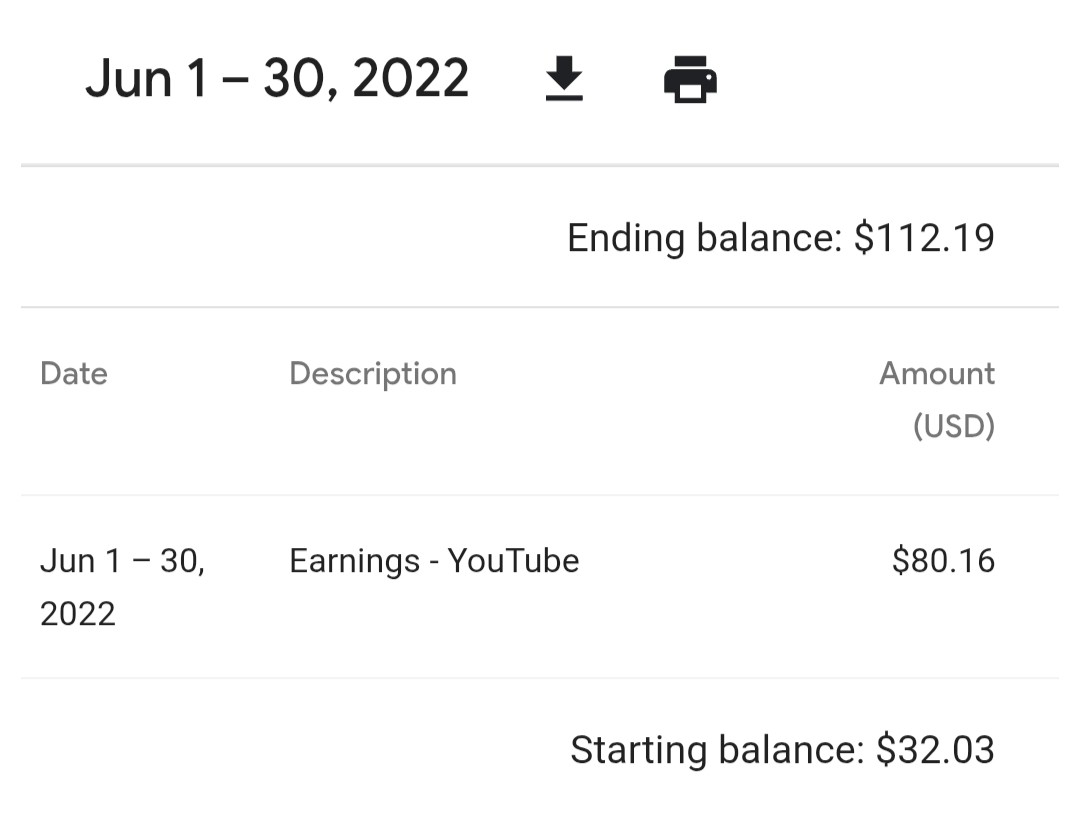
June 2022
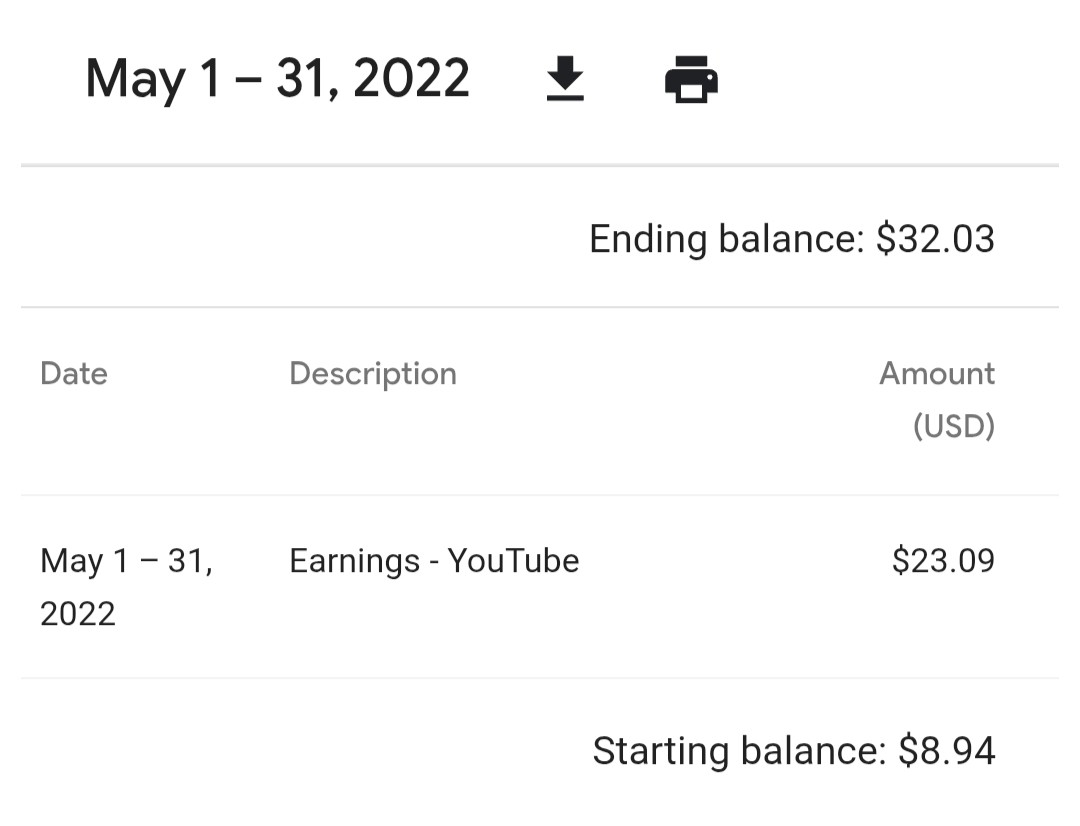
Total after 3 months: $112.19
How the YouTube Payment Process Actually Works
This was probably the most confusing part of monetization for me.
The payment process normally looks something like this:
| Step | What Happens |
|---|---|
| Throughout the month | YouTube estimates your earnings |
| Around the 7th-12th of the following month | Earnings are finalized in AdSense |
| Around the 21st-26th | Google issues the payment |
| After payment is issued | Your bank processes the transfer |
The first time this happened, I received an email from Google AdSense confirming that my payment had been issued.
A short time later, the money appeared in my bank account.
Once you've experienced the payment cycle once, it becomes much easier to understand.
But during my first few months, I found it surprisingly confusing because I expected the money to arrive immediately after reaching the threshold.
Remember: Reaching the $100 payment threshold doesn't mean you'll receive the money instantly. Google first finalizes your earnings, then issues the payment according to its monthly payment schedule.
Understanding the payment process answered one of my biggest questions after getting monetized.
The next challenge was learning what actually affects YouTube earnings, and separating common myths from reality.
Common YouTube Monetization Myths
One of the biggest reasons creators become frustrated is because of misinformation.
After spending years creating content and later building tools around YouTube analytics, I've seen the same misconceptions repeated over and over again.
These are some of the biggest ones.
Myth 1: You Start Making Good Money as Soon as You're Monetized
Monetization simply allows your channel to start earning. For many creators, the first few months generate modest income while they continue building an audience.
My own first three months looked like this:
- Month 1: $8.94
- Month 2: $23.09
- Month 3: $80.16
Getting approved was exciting, but consistent growth came from continuing to publish videos, not from monetization itself.
Myth 2: 1 Million Views Always Means Huge Earnings
No. Revenue depends on factors such as:
- Audience country
- Content niche
- Viewer demographics
- Advertiser demand
- Watch time
- Seasonal advertising budgets
That's why two channels with the same number of views can earn dramatically different amounts.
Myth 3: Shorts and Long Videos Pay the Same
Shorts and long-form videos use different monetization systems. Many creators use Shorts to reach new viewers while relying on long-form content for more consistent advertising revenue.
Myth 4: Deleting Old Videos Improves Monetization
Not necessarily. Deleting videos can reduce watch time, remove search traffic, and eliminate valuable views. Only remove content if it creates copyright or policy issues.
Myth 5: More Subscribers Automatically Mean More Money
Subscribers help your channel grow, but advertisers pay for views, not subscriber counts. A smaller, highly engaged audience can sometimes earn more than a much larger inactive audience.
Key takeaway: successful YouTube channels focus on creating videos that viewers enjoy watching, not simply chasing subscriber numbers.
Tips to Reach Monetization Faster
No strategy guarantees quick monetization, but these practices consistently help creators build sustainable channels.
Publish Consistently
A regular upload schedule gives viewers more reasons to return and provides YouTube with more opportunities to recommend your content.
Consistency doesn't mean uploading every day. It means publishing on a schedule you can realistically maintain.
Focus on Viewer Retention
A 15-minute video isn't valuable if most viewers leave after 30 seconds.
Creating engaging introductions, removing unnecessary filler, and delivering on your title and thumbnail often has a bigger impact than simply uploading more videos.
Build Around Searchable Topics
Creating videos that answer questions people are already searching for can generate steady traffic for months or even years.
Evergreen content often contributes more toward watch hours than videos based only on short-lived trends.
Improve Your Titles and Thumbnails
Your content can't earn watch time if nobody clicks it.
Spend time improving your titles and thumbnails instead of treating them as an afterthought. Even small improvements in click-through rate can significantly increase total views.
Learn From Your Analytics
After publishing a video, review metrics such as:
- Audience retention
- Click-through rate
- Returning viewers
- Traffic sources
These insights help you understand what your audience actually enjoys instead of relying on guesswork.
Remember: monetization is usually the result of consistently improving your content, not finding a shortcut.
What Happens After You Get Monetized?
Many creators think monetization marks the end of the journey. It's the beginning.
Once your channel joins the YouTube Partner Program, you'll continue learning how your audience responds to different types of content, how advertisers value your niche, and what drives long-term growth.
Some creators eventually expand their income through:
- Brand sponsorships
- Affiliate marketing
- Channel Memberships
- Super Thanks
- Merchandise
- Digital products
- Online courses
Advertising revenue can become an important income source, but many successful creators eventually build multiple revenue streams.
Behind This Article
This guide combines:
- My own experience reaching YouTube monetization and receiving my first payment.
- Research from YouTube's official Partner Program documentation and creator policies.
- Insights gained while building the YTKits Monetization Checker and Revenue Estimator tools.
Because YouTube occasionally updates its monetization policies, I review this article regularly to keep the information accurate and current.
Last updated: October 30, 2026
Frequently Asked Questions
What are the new YouTube monetization requirements for 2027?
Starting February 1, 2027, new creators applying for ad revenue sharing will need 1,000 subscribers and either 8,000 valid public watch hours (in 365 days) or 20 million valid Shorts views (in 90 days). The 500-subscriber Fan Funding tier remains unchanged.
Will existing monetized YouTube channels lose monetization in 2027?
No. YouTube says existing YPP members keep their status after February 1, 2027. They still need to review and accept the updated terms in YouTube Studio by January 31, 2027 to keep earning from the affected monetization features.
What happens if my channel gets less than 10 million Shorts views?
If your channel drops below 10 million qualified Shorts views in the last 90 days after February 1, 2027, YouTube says you stay in YPP and your long-form earnings are not affected. You stop earning from the Shorts Creator Pool for that month. You can earn from Shorts again once you meet the threshold, but check Studio for the exact monthly measurement period.
How does Premium Lite revenue sharing work for creators?
YouTube says creators share in a pool representing 60% of net Premium Lite subscription revenue. Standard Premium views use a pool representing 30% of net subscription revenue. YouTube does not publish a single per-view Premium Lite rate, and Premium Lite earnings appear inside your standard Premium metrics, so treat the pool as a shared revenue model rather than a fixed RPM.
Can I monetize my YouTube channel with 500 subscribers?
Yes, eligible creators can unlock certain fan-funding features at 500 subscribers if they meet YouTube's additional requirements.
However, advertising revenue still requires the full YouTube Partner Program thresholds.
Do Shorts count toward watch hours?
No. Public Shorts watch time does not count toward the long-form watch-hour requirement (currently 4,000 hours, increasing to 8,000 in 2027). Instead, Shorts have a separate qualification path based on public Shorts views.
How long does YouTube monetization review take?
Review times vary. Some creators receive a decision within days, while others may wait several weeks depending on application volume and channel complexity.
What happens if my application is rejected?
YouTube normally explains the reason for rejection. After addressing the issue, many creators successfully reapply.
How much money do you need before YouTube pays you?
Google generally issues payments after your finalized earnings reach the applicable payment threshold (commonly $100 USD or the equivalent in your local currency, depending on your payment settings and country).
Does deleting videos affect monetization?
It can. Removing videos may reduce watch time and search traffic, so avoid deleting content unless there's a clear reason, such as copyright or policy concerns.
Related Tools
If you're working toward YouTube monetization, these free YTKits tools may also help:
- YouTube Revenue Estimator: Estimate potential advertising revenue using your channel's category and audience country.
- Monetization Checker: Check whether a channel appears to be monetized.
- YouTube Category Predictor: Identify the most likely category for a video or channel.
- YouTube Video Comparison Tool: Compare performance and engagement metrics between two YouTube videos.
Final Thoughts
When I first started working toward YouTube monetization, I believed reaching 1,000 subscribers and 4,000 watch hours would be the hardest part.
Looking back, I was only partly right.
Those milestones matter, but they're really just the beginning.
With YouTube raising entry thresholds for new creators in 2027 to 8,000 watch hours, focusing on retention, quality long-form content, and building a loyal audience is more critical than ever.
My first payment wasn't life-changing. It was $112.19 after three months. But it was proof that the system works, that patience matters, and that every creator's journey starts somewhere small.
Sources & References
All information in this article comes from:
- Changes to the YouTube Partner Program: official 2027 entry thresholds, activity rules, Shorts changes, and Premium Lite details
- YouTube Partner Program overview and eligibility: current eligibility paths and review process
- YouTube Shorts monetization policies: Shorts Creator Pool, 10 million view rule, and revenue share
- YouTube Partner Program policies: policy requirements for staying monetized
- Tax information for YouTube partners: tax requirements for monetized creators
- YouTube Creator Hub: official creator resources
- Personal experience: 5+ years on YouTube, monetized channel with documented earnings data from 2022