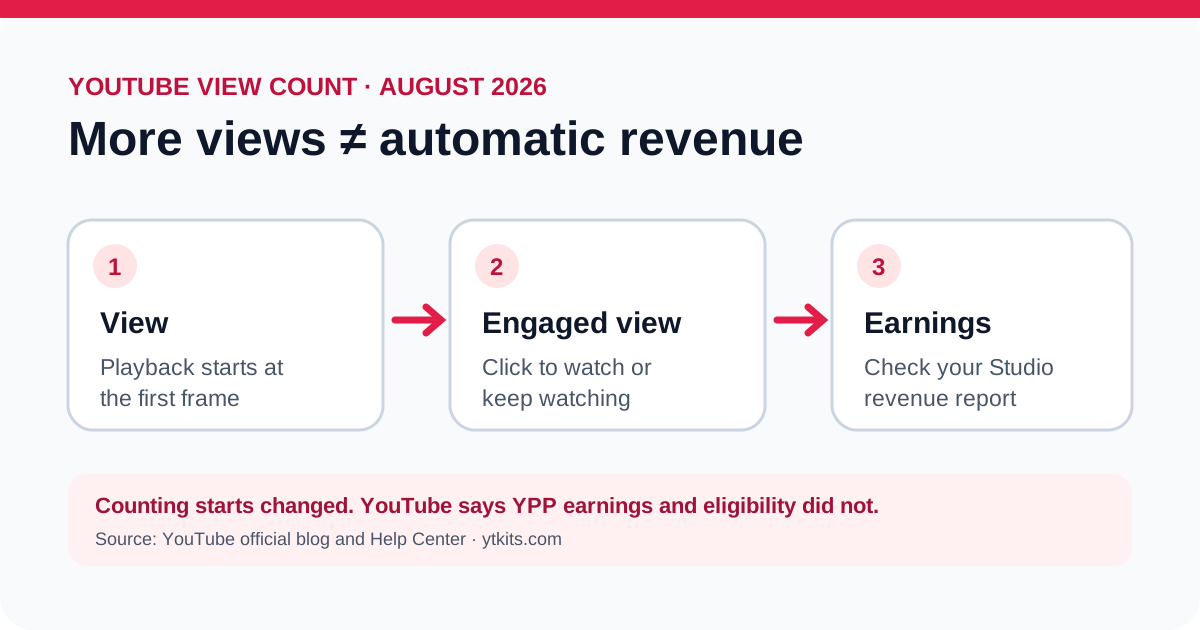
Short answer: Since August 24, 2026, YouTube has counted a view when a video starts playing from its first frame across Shorts, long-form videos, podcasts, and live streams. A higher displayed view count from this definition does not automatically increase YouTube Partner Program earnings. YouTube says earnings continue to use engaged views and engaged watch hours. Public playback starts are not interchangeable with the qualifying metrics used for Partner Program eligibility. See YouTube's announcement and its metric-counting help page.
What changed on August 24?
YouTube's new view definition starts at the first frame of playback. A Short that starts in the feed can count as a view. So can a long-form video that starts autoplaying on Home or when someone hovers over its thumbnail. A thumbnail merely appearing on screen remains an impression, not a view. Clicking or tapping a thumbnail and starting the video counts as both a view and an engaged view, according to YouTube's examples.
YouTube calls the previous view definition an engaged view. It describes this as a person clicking to watch or watching beyond the initial seconds. YouTube does not give one universal seconds threshold in that announcement, so a creator should not assume that every playback lasting a particular number of seconds qualifies.
| Measure | What it helps answer | What it cannot prove by itself |
|---|---|---|
| Views | How often playback started under the new definition | How much revenue the video earned |
| Engaged views | How often viewers clicked to watch or continued beyond the initial seconds | That an ad ran or that each view earned money |
| Qualified Shorts views / qualified watch hours | Progress toward the relevant YPP eligibility route | That the channel has met every requirement or passed review |
| Estimated revenue | What YouTube Studio currently attributes to the selected period | That the view-count definition caused a revenue change |
The labels matter because a rising public counter can describe more counted starts, a different counting rule, or both. It is not enough evidence to infer a matching change in audience attention or earnings.
For eligibility, use YouTube Studio → Earn. YouTube's detailed YPP eligibility guide distinguishes qualified watch hours for the long-form route from qualified Shorts views for the Shorts route. Subscriber requirements, other eligibility conditions and channel review still apply. Do not use the public view counter as an eligibility calculator.
Does revenue increase when the view count increases?
Not from the counting change alone. YouTube explicitly says the August update does not change YPP earnings or eligibility. YouTube's Help Center states this directly. A change in measurement should be separated from a change in the audience or revenue itself.
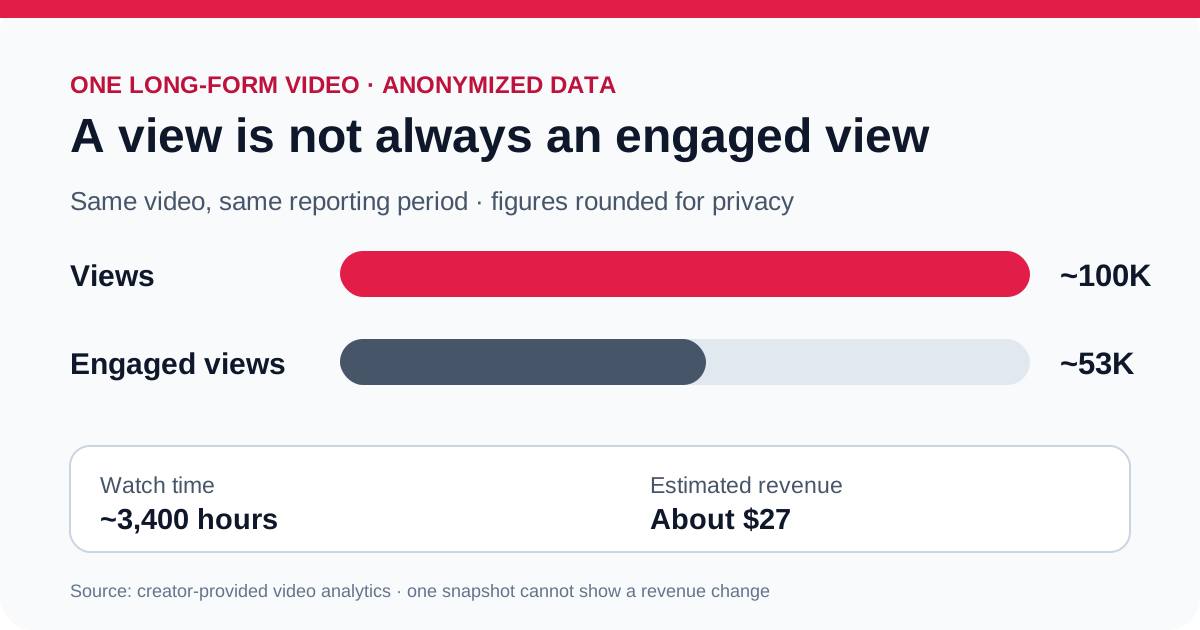
The difference between views and engaged views is visible in one long-form video from the YTKits creator's own YouTube Studio. The anonymized example below uses rounded figures from the screenshots the creator supplied. It is a single-video observation, not a before-and-after test of the policy update.
| Studio measure for this video | Rounded figure |
|---|---|
| Views | Approximately 100,000 |
| Engaged views | Approximately 53,000 |
| Watch time | Approximately 3,400 hours |
| Estimated revenue | About $27 |
All four screenshots show analytics for the same video with a Since published range. The public chart omits the video's topic, title, channel identity, duration, exact publication date, and the original Studio interface. The displayed view number is rounded by Studio, so do not treat the difference between the two counters as an exact percentage. More importantly, that difference is not a count of lost ad payments: not every engaged view shows an ad. The reported estimated revenue is not an ad-revenue breakdown, and the video's ad settings were not supplied. The screenshots do not show what this video would have earned under the old public view definition, so they cannot establish that the August change raised or lowered its revenue.
Revenue can still rise or fall for ordinary reasons: the number of engaged viewers may change, a different share of playbacks may show ads, advertiser demand and audience geography may shift, or other monetization sources may change. YouTube's ad revenue analytics guide explains why views, monetized playbacks, ad impressions, CPM, RPM, and estimated revenue describe different things.
What if RPM changes around the update?
Do not assume the new public view definition caused it. As checked on October 2, 2026, YouTube's RPM explanation explicitly says RPM is calculated per 1,000 engaged views, but its comparison table also retains wording that distinguishes Shorts engaged views from video views. The page is not fully consistent about the denominator. Read the metric definition shown in your Studio report and keep the format and date range with any quoted RPM. A lower rate alone does not establish a lower payment.
Why the denominator matters: a calculated example
Suppose a report showed $100 in revenue, 20,000 playback starts, and 10,000 engaged views for one reporting period. These are invented figures for arithmetic, not another channel case study or a claim about a particular Studio report.
| Calculation | Result | What it describes |
|---|---|---|
| $100 / 20,000 starts × 1,000 | $5 | Revenue per 1,000 starts |
| $100 / 10,000 engaged views × 1,000 | $10 | Revenue per 1,000 engaged views |
The revenue is $100 in both calculations. Only the denominator changes. Neither calculation establishes that YouTube paid less after a counting update, and neither should be labeled as a measured Studio RPM without checking the report's definition and scope.
The same mismatch can inflate a forecast. Applying the example's $10 rate per 1,000 engaged views to 20,000 starts would produce $200, twice the stated revenue. That error comes from mixing units. It is not evidence of unpaid earnings.
Before using a revenue rate, record which revenue sources it includes, which view measure it uses, the format and the dates. If a public-data tool cannot supply the matching denominator, its output remains an assumption-based scenario.
How to check the effect on your channel
Use YouTube Studio rather than a public video counter for an earnings claim. For a useful check:
- Choose one format first: Shorts, long-form, or live. Mixing formats can hide what changed.
- Set a specific date range after August 24, 2026. Record the range with your figures.
- Note Views and Engaged views where Studio makes both available. For monetized content, also note Estimated revenue and, if available, Estimated monetized playbacks or Engaged watch hours.
- Compare a similar period or group of videos with comparable topics and audience sources. Label older Shorts data carefully because Shorts received a separate view-count update in 2025.
- Look for changes in engaged viewing and revenue, not just the displayed view total. Allow for reporting delays and YouTube's removal of low-quality playbacks.
This is an observational check, not a controlled experiment. Two date ranges can differ in uploads, seasonality, traffic sources, viewers, and ad demand. A before-and-after screenshot alone cannot prove that the definition change caused a revenue movement.
You can share a useful example without disclosing your channel. Crop or cover the channel name, avatar, video titles, thumbnails, URLs, and any identifying annotations. Keep the format, date range, metric labels, and view counts visible. If you prefer to hide earnings, share the percentage change rather than the amount. The same information can be typed instead of shown in a screenshot.
What this means for YTKits revenue estimates
The YTKits Revenue Estimator starts with public YouTube data and user-selected assumptions. It cannot read a channel's private engaged views, watch hours, monetized playbacks, RPM, or actual revenue. After the first-frame change, a public view count is especially easy to mistake for a count of revenue-generating watches.
Use the estimator to explore a scenario, then use YouTube Studio for your own earnings. If you enter a public count and an assumed RPM, the result is conditional arithmetic, not a verified payment. Our calculator methodology guide explains the inputs and limits in more detail.
Is this the same as the 2025 Shorts update?
No. On March 31, 2025, YouTube changed how Shorts views were counted: starts and replays began counting without a minimum watch time, while the older measure remained available as Engaged views. The August 24, 2026 announcement standardized first-frame counting across formats, including long-form videos and live streams. Treat those as two separate changes when comparing historical charts. Sources: YouTube Shorts Help; YouTube's 2026 announcement.
Frequently asked questions
Does a thumbnail impression count as a view?
No. Thumbnail exposure and playback are separate events. A registered thumbnail impression also has visibility and surface requirements; merely appearing somewhere does not always count. See YouTube's impressions guide. If hovering starts autoplay, playback can count as a view under the first-frame definition.
Does every new view earn money?
No. A first-frame start is not automatically an engaged view, an ad impression, or a monetized playback. YouTube says the definition update itself does not change YPP earnings. YouTube Help.
Did the recommendation algorithm change too?
YouTube says this view-count update did not change recommendations. It also says analytics such as click-through rate, average view duration, and retention remain anchored on engaged views. YouTube's announcement.
Will my old videos suddenly have different lifetime totals?
YouTube says the new definition applies going forward from August 24, 2026. Do not assume a historical chart was recalculated unless Studio shows that for the particular report. YouTube's announcement.
How this article was checked
Official sources checked October 2, 2026: YouTube's August 19, 2026 announcement, its engagement-counting help page, the separate 2025 Shorts explanation, its ad revenue metrics guide, and its YPP eligibility guide.
Case-study evidence: The original article records four creator-supplied Studio screenshots of one long-form video's Overview, Reach, Engagement, and Audience tabs as the source of the rounded figures. Those figures are preserved in this update. The original screenshots are not published here, so readers cannot independently verify the transcription from this page. The chart is an anonymized reconstruction, not a Studio screenshot or a controlled experiment. The case does not establish why this video earned about $27 or how the counting update affected its earnings.
October 2 update: With AI assistance, clarified eligibility metrics and the inconsistent RPM wording in YouTube's documentation, and added a separately labeled arithmetic example. No new channel measurements were added. Report factual errors through the corrections page.