
YouTube Analytics: What Actually Moves the Needle (Gaming Creator Edition)

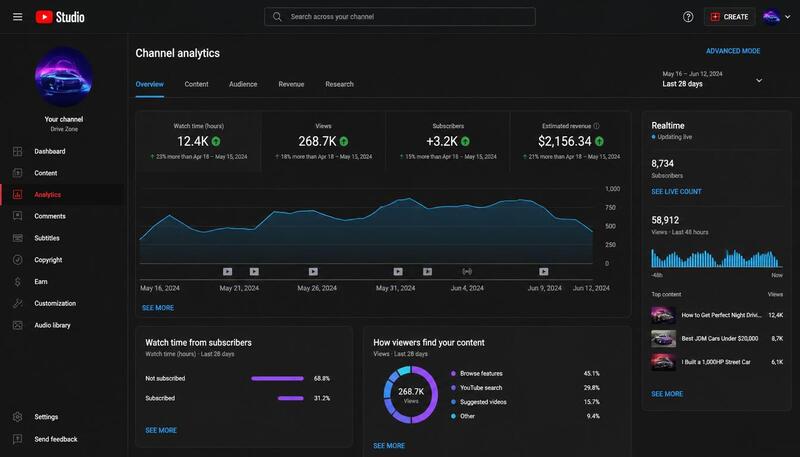
YouTube Studio dashboard with real-time metrics showing CTR, retention, and subscriber changes

Note: This is a representative illustration showing typical YouTube analytics dashboard layouts. Your actual YouTube Studio interface may vary depending on video type, audience location, and current YouTube features. Real-time metrics update continuously as viewers interact with your videos.

I uploaded 100 gaming videos before I realized analytics mattered at all.

My early strategy was simple: upload anything, check the view count, move on. Some videos got 1000 views. Some got 500. I had no idea why. I just kept uploading, hoping one would pop off.

It wasn't until I started obsessively checking titles and thumbnails every day—watching how they affected my CTR, retention, subscribers in real-time—that I understood something fundamental: the numbers in YouTube Studio weren't just vanity metrics. They were literally telling me what to do next.

After roughly 150 videos... I started learning which metrics actually matter and which ones waste your time. Now with over 1000 total uploads, I understand WHEN to check them and why. This is what I actually do, with zero fluff.

Why I Started Building YTKits

This obsession with analytics is exactly why I built YTKits. I was constantly tweaking titles and thumbnails in real-time, watching how impressions and CTR shifted every hour, and I realized there had to be a better way to see these patterns. Most "analytics guides" talk about metrics in theory. I needed to understand them in practice—at the speed of real-time feedback.

The Analytics Funnel

Before I explain individual metrics, understand how they connect:

Impressions
     │
     ▼
CTR (Did they click?)
     │
     ▼
Audience Retention (Did they keep watching?)
     │
     ▼
Watch Time (How long did they stay?)
     │
     ▼
Engagement (Likes, comments, shares)
     │
     ▼
Subscribers (Will they come back?)
     │
     ▼
Returning Viewers (Long-term channel health)

Analytics Funnel showing how metrics flow from impressions through CTR, retention, watch time, engagement, to subscribers and returning viewers

Most creators focus on just one metric. Smart creators understand the funnel. A video can have 10,000 impressions but if CTR is below 2%, most of those impressions are wasted. A video can have great CTR but terrible retention means people clicked but left immediately. The whole funnel matters.

The First Thing That Mattered: Your Title

Before I understood CTR, retention, or any other metric, I learned that title writing is everything.

My worst gaming videos were the ones with lazy titles. "New Game Update" or "Let's Play." Generic. No hook.

When I started writing titles that actually made people curious—"This New Update BREAKS The Game" or "I Found The Broken Strategy Everyone's Abusing"—impressions jumped. But more importantly, impressions alone don't tell the story. I had to watch what people actually clicked on.

That's when CTR became real to me.

According to YouTube Creator Academy, click-through rate helps creators understand how effectively thumbnails and titles persuade viewers to click. Combined with viewer satisfaction signals such as retention, it provides useful feedback about packaging performance.

CTR: The Metric That Matters Most

CTR tells you one thing: did people actually want to watch what you promised in your title?

My worst CTR in gaming was between 2-5%. That meant out of every 100 people who saw my thumbnail, only 2-5 clicked. I had a problem.

I fixed it by understanding what types of titles and thumbnails people in my niche actually respond to. Twitching—meaning I'd slightly adjust wording, test different thumbnail styles, and watch the CTR change in real-time. Sometimes it took three or four tweaks to hit something that worked.

My best CTR is 15-20%, but here's the important part: CTR drops as videos get more impressions.

Why? Because YouTube's algorithm gives your video to increasingly cold audiences. The first 1000 impressions come from people already interested in similar content. The next 10,000 impressions come from broader audiences who've never seen you before. Naturally, the CTR will drop. This is normal.

According to YouTube Creator Academy, CTR varies dramatically by niche, audience, and traffic source. On my gaming channel, CTR below roughly 4% often signals I need to rethink the title or thumbnail. However, don't compare your CTR to other creators'. A gaming channel's CTR will look completely different from a finance or education channel's CTR because the audiences behave differently.

Note on CTR: The CTR numbers I mentioned (2-5% worst, 15-20% best) are specifically Click-Through Rate on impressions. This is the percentage of impressions that resulted in clicks—YouTube Studio calls this "Impressions CTR." This is different from click rate on video suggestions or other click metrics.

Thumbnail: The Supporting Actor

Title is the star. Thumbnail is the supporting actor that makes the title work or breaks it.

I realized early that a great thumbnail without a strong title still doesn't get clicks. But a great title with a weak thumbnail also fails. They have to work together.

For gaming specifically, what works:

  • Bright colors that pop against other thumbnails in suggested videos
  • Clear reaction or emotion (frustrated face, excited face, skeptical face)
  • Text that reinforces the title (not repeating it, but supporting the promise)
  • Trending game elements if you're covering game updates

The mistake most gaming creators make is cramming too much into the thumbnail. I see channels with three game logos, two text layers, and a face all competing for attention. It's chaos. Simplicity wins.

Retention: The Quality Check

If CTR is about whether people click, retention is about whether your video deserves to exist.

According to YouTube Creator Academy, audience retention is critical because it shows YouTube whether viewers actually found your content valuable. The more people who watch longer, the more the algorithm promotes your video.

I monitor retention graphs specifically for where people DROP OUT.

Long intros kill retention. If your intro is 10 seconds or longer, it better be giving viewers the core idea of what they're about to watch. Even if it's well-produced, if people don't immediately understand "why should I care," they leave.

I fixed this by front-loading the value. First 3-5 seconds: show what the video is about. Then you can build from there.

Video quality matters enormously. If your production is poor—bad audio, choppy editing, unclear gameplay footage—retention will tank even if your title and thumbnail are perfect. This is the one area where I won't cut corners.

Competing content kills retention. If I upload a video about a game update and a big YouTuber uploaded the same topic 2 days earlier with better production, my retention will suffer. People have already seen the analysis. They're not coming back for a second opinion unless I'm offering something unique.

Trending topics help retention. Gaming thrives on trends. When a new update drops or a new game mechanic breaks the meta, people want fresh content on that topic. Those videos historically hold retention better because the audience is actively seeking that specific information right now.

Real-Time Analytics: The 24-Hour Window

Here's the truth: on my gaming channel, the first 24 hours usually determine a video's initial trajectory.

According to YouTube's creator documentation, videos establish their initial performance trajectory in the first 24–48 hours. In my experience with gaming, most of my videos find their initial level of algorithmic push or suppression within the first 24 hours, although YouTube can continue recommending videos weeks or even months later.

I check real-time views at specific intervals:

  • 45 minutes after upload – Is the video getting ANY traction from subscribers and homepage?
  • 2 hours – Are impressions climbing steadily?
  • 4 hours – Is retention good or am I losing people?
  • 12 hours – Final check before I stop tinkering

Since I upload daily, I'm checking real-time analytics every single day. It's become part of the routine.

If a video is flopping in the first 4-6 hours—CTR is under 3%, retention is dropping like a cliff—I make changes immediately. Usually:

Swap the thumbnail. Changing a thumbnail may improve future click-through rate if the new version resonates better with viewers. In my experience, YouTube sometimes expands testing after a successful thumbnail change, but results vary by video.

Adjust the title slightly. If the CTR is terrible, people aren't even clicking. I'll tweak keywords or add urgency if it feels appropriate.

Promote externally. Post to Discord communities, Reddit, Twitter if relevant. Inject engagement to signal YouTube the video is worth pushing.

After 12 hours, I stop changing things. After 24 hours, the algorithm has mostly made its decision about whether this video will be promoted or buried.

Note on CTR: The CTR numbers I mentioned earlier (2-5% worst, 15-20% best) are specifically Click-Through Rate on impressions. This is the percentage of impressions that resulted in clicks—YouTube Studio calls this "Impressions CTR." This is different from click rate on video suggestions, which operates on different metrics.

Traffic Sources: Where Your Real Viewers Come From

Most of my views come from Browse and Suggested Videos.

Browse means YouTube put me on the homepage or feed. This is "algorithmic" reach—YouTube believes people will like this.

Suggested Videos means I'm showing up next to other gaming videos people are already watching. This is driven by topic similarity and my video's engagement performance.

What I've learned:

  • Browse traffic is fast, viral traffic. High volume, short shelf-life.
  • Search traffic is slow, loyal traffic. Takes days to build, but holds steady.
  • External sources (Discord, Reddit, Twitter) bring views but not subscribers. People watch once and leave.
  • Channel subscriptions drive repeat viewers. These are your most valuable views long-term.

I track which source brings the best engagement because views from browse feel good but don't build a sustainable channel. I want viewers who might subscribe and come back.

The Real-Time Adjustment Ritual

This is my actual workflow, every single day:

First 2 hours after upload:

  • Check real-time impressions and initial CTR
  • If CTR is below 3%, swap the thumbnail immediately
  • Check retention graph—did I lose people in the intro?

After 12 hours:

  • Final retention check
  • Look at what traffic source is bringing views
  • Decide if I need any final tweaks

Daily (for 3 days after upload):

  • Monitor how impressions trend
  • Watch CTR settle as broader audiences see it
  • Note what retention looks like compared to my other gaming videos

Weekly:

  • Look at my last 5-7 videos and identify patterns
  • Which themes got best CTR? Best retention? Most subscribers?
  • Plan next week's content based on what actually worked

That's it. I don't obsess over analytics. I check the metrics that matter, make fast decisions, and move on.

Real-time adjustment actions showing three steps: swap thumbnail, adjust title, and promote externally within the first 4-6 hours

What I Actually Ignore

Most analytics are noise:

Likes vs Comments ratio. Engagement is good, but it's downstream. If CTR and retention are healthy, engagement follows naturally.

Card click-through rate. Marginal impact. Not worth optimizing.

Watch time as a raw number. Trending watch time matters more than absolute numbers. Is it going up or down week-over-week?

Subscriber count as a vanity metric. A channel with 10K engaged subscribers that gains 100 subs per video is healthier than a channel with 100K subscribers that gains 50 subs per video. I care about subscriber growth rate, not total count.

Subscriber Growth: What Actually Matters

I don't look at subscriber totals. I look at subscribers gained per video. That's the difference between measuring channel size and measuring what content actually convinces people to stick around.

I noticed early that some videos got tons of views but zero new subscribers. Others got half the views but converted 10 times as many subscribers. That gap told me everything.

What brings subscribers:

Consistent niche content. Early mistake was uploading videos on any game that was trending. Subscribers didn't come back because they had no idea what to expect next. When I stuck to one game and built expertise there, subscription rate climbed.

Series or recurring themes. Videos that are part of a series get better subscriber conversion because the viewer knows there's more coming. A video about "Best Strategies for Game X" on its own gets some clicks. But "Best Strategies for Game X: Episode 5" of an ongoing series gets way more subscribers because people want to see Episode 6.

Personality consistency. Subscribers want to know what they're getting. If I film some videos angry-frustrated-response style and other videos calm-tutorial style, people don't subscribe because they don't know what to expect. Once I settled on a consistent tone and format, subscribers came faster.

End screens and CTAs. I used to end videos and just... end them. No call to action. No reminder to subscribe. I added simple end screens asking for subscriptions and saw a bump. Not huge, but it works.

Video quality above a threshold. Once my production quality was decent, subscriber rate didn't climb by making it "more professional." It climbed by uploading more consistently and staying on-topic. Quality matters but only to a minimum threshold. Beyond that, consistency and content matter more.

The real insight: not all views are equal. A video that brings 10 engaged subscribers who watch 5 of your next videos is worth more than a video that brings 1000 casual views and 0 subscribers. I optimized for the first, not the second.

The Gaming Creator's Advantage

Gaming has built-in advantages for real-time analytics:

Gaming communities are FAST. When a new update drops, people search immediately. When a strategy breaks the meta, viewership spikes. This means I can see what works in real-time—not weeks later.

This is why I started tweaking daily. Gaming rewards speed. A video about a trending game mechanic uploaded the same day it trends gets exponentially more views than one uploaded 3 days later.

Retention is predictable in gaming. People know what they're signing up for. A gameplay video has a predictable retention curve. If my curve is different—much steeper drop-off—I know something is wrong with production or pacing.

My Biggest Analytics Mistake

For a long time, I treated every metric equally.

I'd see a video with 5000 views and feel successful, even if it brought 0 new subscribers. I focused on the NUMBER, not what it meant.

Then I realized something: two videos could have identical view counts but completely different value:

  • Video A: 5000 views, 10 new subscribers, high watch time, repeat viewers
  • Video B: 5000 views, 0 new subscribers, people leave after 20 seconds

Same view count. Completely different health signals.

That's when I started obsessing over what the video actually accomplished, not just how many people watched it.

Now I track subscribers per video. Not total subscribers. Per video. This tells me which content actually convinces people to stick around. Once I identified which themes brought subscribers, I made more of that content. Channel growth accelerated.

The mistake was simple: I was measuring channel size instead of measuring what content works. Fix that one thing and everything else becomes clearer.

My Weekly Analytics Checklist

Every Monday I spend about 15 minutes reviewing my latest videos.

✅ CTR below 4%? → Test a new thumbnail.

✅ Retention drops in the first 30 seconds? → Rewrite the next video's introduction.

✅ One video gains far more subscribers than the others? → Plan a follow-up.

✅ Search traffic increasing? → Create more videos around those keywords.

That's it.

I don't spend hours staring at analytics.

I just look for one improvement before the next upload.

Frequently Asked Questions

What's a good CTR for a gaming channel? It varies by whether you're new or established. On newly published videos, I aim for 6-10% as a baseline. After 48 hours when the algorithm shows it to broader audiences, expect that to drop to 2-5%. Many creators report similar patterns, although healthy CTR varies considerably by niche, audience, and traffic source.

Why does my CTR drop so much after the first day? The first 24 hours, YouTube shows your video to people most likely to click—your subscribers and similar audiences. After that, it starts showing broader audiences who might not be in your niche. Lower CTR is normal and expected.

Should I check real-time analytics obsessively? Only if you're trying to fix a flopping video in the first 12 hours. After that, you're just stressing yourself out. Make your changes and let the algorithm do its job.

What do I do if retention drops 30% into my video? Watch that timestamp yourself. What happened? Did you switch topics? Poor editing? Boring section? Fix that pattern in your next video. Don't worry about the current video—it's already live.

How often should I upload to see analytics patterns? At least 2-3 videos per week minimum if you're trying to learn. One video per week makes pattern-finding take 2 months instead of 2 weeks.

Does analytics matter more than content quality? No. Content quality is non-negotiable. Analytics just help you understand which quality content actually works for your audience. Bad content won't succeed no matter how perfect your analytics.

Should I compare my analytics to big gaming channels? No. A 1M subscriber channel and a 50K channel have completely different audience dynamics. Compare yourself to where YOU were 3 months ago.

Why is my CTR high but views low? If CTR is good but views aren't climbing, you're not getting enough initial impressions. This usually means YouTube is testing your video with a small audience and the retention or engagement signals aren't strong enough to expand distribution. Check retention—if people leave quickly, YouTube won't push it further.

What is more important: CTR or retention? Both matter, but in sequence. CTR gets people to click. Retention tells YouTube if they should promote it further. A video can have high CTR but if retention is terrible, YouTube stops pushing it. Both need to be healthy.

Why did my impressions stop climbing? Usually means retention dropped or engagement signals weakened. YouTube decided the video isn't worth promoting to more people. Sometimes it's just that the video reached its natural audience ceiling. Check your stats to see when the impression growth flattened.

How often should I change thumbnails? Test swap bad-performing thumbnails within the first 12 hours. After 48 hours, the algorithm has mostly decided. You can refresh evergreen videos periodically, but don't obsess over changing thumbnails on videos that are already performing well.

Why does a video suddenly take off weeks later Because YouTube continues testing videos long after publication if new audiences respond positively.


Behind This Article

This guide is built on:

  • 1000+ videos uploaded in the gaming niche across 5+ years of real hands-on YouTube experience
  • Daily real-time testing of titles, thumbnails, and analytics workflow
  • Personal observations from monitoring my own retention graphs, CTR patterns, subscriber growth, and traffic source performance
  • YouTube's official creator guidance from YouTube Creator Academy and YouTube Help Center

Everything I discuss about my workflow reflects exactly how I use YouTube Studio. I don't theorize about metrics. I report on what I see in my channel's real data.

When I mention CTR ranges (2-5% worst, 15-20% best) or retention patterns, they're based on my gaming channel experience.

Key Sources


Related Tools

Use these YTKits tools to apply what you've learned: