

Picking the Right YouTube Category: What I Learned Building an AI Category Predictor

Quick summary: I didn't set out to build a YouTube category tool. I was building a Revenue Estimator, and that project led me somewhere I didn't expect: the category YouTube shows through its API often doesn't describe what a channel actually creates. That discovery became the YTKits AI Category Predictor — and this article walks through everything I learned along the way.


Why I Ended Up Building a Category Predictor

Like most side projects, this one started because I was trying to solve a different problem.

I was building the YTKits Revenue Estimator — a tool that estimates how much a YouTube channel could earn based on publicly available data. One of the biggest inputs for revenue estimation is content category, since different niches attract different advertisers and very different RPMs.

At first, I assumed this part would be easy. I'd just ask YouTube what category a channel belongs to.

So I read through the YouTube Data API documentation and started testing it against real channels. YouTube does expose category data — but after manually checking dozens of channels and videos, something felt off.

The Problem I Didn't Expect

Some channels clearly produced educational content. YouTube reported something completely different.

  • Programming tutorials showed up under People & Blogs
  • Finance content appeared as Education
  • Cooking channels landed in Howto & Style
  • Some gaming creators had categories that didn't match their uploads at all

At first I figured I was misreading how categories worked. So I compared more channels. Then more videos. Then even more.

One pattern kept showing up: many creators never touch the default category, and others just pick whatever option seems closest without thinking much about it.

To be clear — I can't say this directly hurts a video's performance, since YouTube has never confirmed that. But it does mean the official category isn't always an accurate description of the content. That raised an obvious question:

Could AI predict a category that actually matches the content?

That question became a new project.

From Revenue Estimator to AI Category Predictor

The Category Predictor wasn't planned from day one — it existed because the Revenue Estimator needed better category data.

Instead of relying only on the category YouTube's API returns, I wanted a second opinion based on the content itself. So I started training a model on:

  • Video titles
  • Channel descriptions
  • Metadata
  • Content patterns

Rather than replacing YouTube's category, I decided to show both side by side. That's still how YTKits works today. When someone enters a channel or video, the tool shows:

  • ✅ The category YouTube reports
  • 🤖 The category the AI predicts

If they agree, that's a good sign. If they don't, creators get a reason to look closer instead of assuming the API is automatically right. That comparison turned out to be far more useful than showing a single category.

How the Tool Works

  1. Paste any public YouTube channel or video URL
  2. YTKits pulls publicly available metadata
  3. The AI analyzes it and predicts the most likely category
  4. The prediction is compared against YouTube's official category
  5. The tool shows whether they match — and explains the result

It doesn't change anything on YouTube. It just gives creators a second way to check how their content is actually being classified.

Category Predictor showing PewDiePie's category

Can AI Really Predict a YouTube Category?

Not perfectly — and I don't think any honest developer should claim otherwise.

Some categories are easy calls. Others naturally overlap. Programming tutorials, AI explainers, and software reviews could reasonably fit Education or Science & Technology. Even humans disagree on calls like these, so expecting a model to be right 100% of the time isn't realistic.

My actual goal was simpler: build a model that gives useful predictions while staying honest about where it struggles. That's why the tool shows both categories instead of pretending the AI is always correct.

What Surprised Me Most: YouTube's Category System Itself

The biggest surprise during development wasn't the AI — it was how limited YouTube's category list actually is.

Most creators assume there's a category for nearly every niche: finance, health, food, productivity, business, AI, programming. There isn't. YouTube officially provides only 15 public video categories. That means very different niches often get grouped together:

Content Topic Usually Maps To
Finance Education
Food Howto & Style
Health & Fitness Howto & Style
Programming Science & Technology or Education

This is exactly why two channels covering completely unrelated subjects can end up sharing the same official category — and why I decided the model should predict more specific content topics internally, then map those back to YouTube's official list.

Building the Model Was Harder Than I Expected

I assumed the hardest part would be training the model itself. It wasn't. The hardest part was deciding what "correct" actually meant.

With only 15 official categories, plenty of content naturally fits more than one. A programming tutorial could reasonably sit under Education (it's teaching something) or Science & Technology (the subject is tech). Neither answer is wrong. The same ambiguity shows up with food, fitness, and finance content.

I quickly realized the model wasn't just learning categories — it was learning how YouTube compresses many different topics into a small set of labels. That turned out to be a much bigger challenge than I expected.

The Recurring Error: Education vs. Science & Technology

During early testing, one mistake kept repeating: the model kept confusing Education and Science & Technology.

I checked the code — nothing wrong. I checked the dataset — still nothing obvious. After manually reviewing many examples, I realized the issue wasn't the model. It was the content itself.

Channels teaching Python, AI, machine learning, web development, Linux, or cloud computing genuinely sit on the border between those two categories — even human reviewers would disagree on some of them. Once I understood that, I spent time cleaning the training data, removing noisy examples, and refining labels. After several rounds, predictions became noticeably more consistent. The model still isn't perfect, but it separates these two categories far better than my first version did.

Why I Added an Internal "Lifestyle" Category

Two other official categories — People & Blogs and Howto & Style — overlapped more than I expected. Daily routines, productivity tips, morning habits, and self-improvement content could reasonably fit either one, and that overlap kept confusing the model.

Instead of forcing a false distinction, I introduced an internal Lifestyle category during training. The model decides whether content belongs there first, then maps it back to the closest official YouTube category. It's a detail users never see directly, but it noticeably reduced confusion in the predictions.

Why My Model Doesn't Just Predict Official Categories

This is probably the biggest difference between my tool and the raw YouTube API. The API returns whatever category is attached to a video. My model tries to understand what the content is actually about — recognizing internal topics like finance, food, health & fitness, technology, education, gaming, music, and sports, then mapping those back to the nearest official category:

Content Topic Usually Maps To YouTube Category
Finance Education
Food Howto & Style
Health & Fitness Howto & Style
Technology Tutorials Science & Technology
Coding Courses Education or Science & Technology

This makes the prediction more useful in practice, since creators tend to think in terms of their niche — not YouTube's limited category list.

What 8,241+ Channel Analyses Taught Me

Since launch, users have run the Category Predictor on 8,169+ YouTube channels — large creators, small creators, gaming channels, educators, businesses, and personal brands.

Most Common YouTube Categories: Real Data

The clearest trend: Entertainment dominates. That tracks, since it's one of YouTube's broadest categories — reaction videos, celebrity news, commentary, challenges, and general creator content all land there.

Lifestyle (my internal category) also showed up far more often than expected, which reinforces why I built it in the first place — a lot of channels genuinely live between People & Blogs and Howto & Style.

Meanwhile, categories like Technology, Sports, and Vehicles appeared much less often. That doesn't mean those niches are small — it means they're far more specialized than broad umbrella categories like Entertainment.

As more channels get analyzed, I'm curious whether this distribution holds or shifts as creator trends change. I'll update this section as the dataset grows.

How I Personally Decide Which Category Fits a Channel

The question I get most often: "Which YouTube category should I choose?"

My answer is always the same: don't start with the category list — start with your content. I ask myself three questions:

1. What is the creator consistently uploading? Ignore the one viral outlier or one-off experiment. Look at the channel as a whole. Weekly Python tutorials point to Education or Science & Technology. Weekly football breakdowns point to Sports. The category should match what a subscriber expects to see next.

2. What would a new viewer call this channel? If someone found the channel today and had to describe it in one sentence — "this is a cooking channel," "this is a gaming channel," "this is a personal finance channel" — that instinct is usually more reliable than optimizing for advertiser rates.

3. Does the current category actually describe the content? This is the exact question the Category Predictor is built to answer. If the AI prediction matches YouTube's reported category, that's a good sign. If it doesn't, it's worth asking why — maybe the current category is still fine, or maybe there's a better fit. Either way, it becomes a conscious decision instead of a default left untouched.

The 15 Official YouTube Categories, Explained Simply

Most articles on this topic just copy YouTube's own category descriptions, which isn't very useful. Here's how I actually think about each one after building this tool:

Category Usually Best For
Film & Animation Animation, movie reviews, filmmaking
Autos & Vehicles Cars, bikes, repairs, automotive content
Music Songs, covers, music production
Pets & Animals Animal care, pets, wildlife
Sports Sports analysis, coaching, training
Travel & Events Travel guides, tourism, events
Gaming Gameplay, esports, game reviews
People & Blogs Personal vlogs and general creator content
Comedy Sketches, stand-up, humor
Entertainment Reactions, celebrity news, commentary
News & Politics Current affairs and political discussion
Howto & Style Tutorials, beauty, DIY, cooking, productivity
Education Courses, lessons, explainers
Science & Technology Tech reviews, programming, gadgets, AI
Nonprofits & Activism Charity and social causes

Notice what's missing: there's no official category for finance, health, fitness, business, productivity, or AI. YouTube simply folds these into broader categories instead. (See YouTube's official category reference in the YouTube Data API documentation for the source list.)

Should You Change an Existing Category?

Yes — but only if it genuinely doesn't describe your content.

I've seen creators panic after reading claims that category is some secret ranking factor. I don't think that's the right way to look at it. Changing a category won't turn a weak video into a viral one — your thumbnail, title, audience retention, and viewer satisfaction matter far more.

That said, if your content clearly belongs somewhere else, updating the category is a reasonable housekeeping move. Think of it as cleaning up your metadata, not hacking the algorithm.

Common Mistakes I Keep Seeing

Leaving everything as People & Blogs. Sometimes it's correct. Often it isn't. If your channel has a clear niche, a more specific category usually describes it better.

Chasing higher-RPM categories. I get the instinct — everyone wants higher earnings — but picking "Science & Technology" for a gaming channel just because tech tends to pay more doesn't hold up. Your category should reflect your content, not your income goals.

Treating category like an SEO trick. Category is one small metadata signal. If your thumbnails don't get clicks or viewers drop off in 30 seconds, changing your category won't fix that. Always prioritize videos people actually enjoy watching.

My Pre-Publish Category Checklist

Before publishing, I run through four quick questions:

  • ✅ Does this category honestly describe the content?
  • ✅ Would a new viewer agree with it?
  • ✅ Does it match similar successful channels?
  • ✅ Is there a more specific category available?

If the answer is yes across the board, I move on to more important things — like the title and thumbnail.

Where Category Ranks Among Other YouTube SEO Signals

Signal Relative Importance
Thumbnail ⭐⭐⭐⭐⭐
Title ⭐⭐⭐⭐⭐
Audience Retention ⭐⭐⭐⭐⭐
Viewer Satisfaction ⭐⭐⭐⭐⭐
Description ⭐⭐⭐⭐
Category ⭐⭐⭐
Tags ⭐⭐

Category isn't at the top of that list — but it's not something to ignore either. It takes seconds to choose the right one, and since it's part of your video's public metadata, it's worth getting right before you hit publish.


Frequently Asked Questions

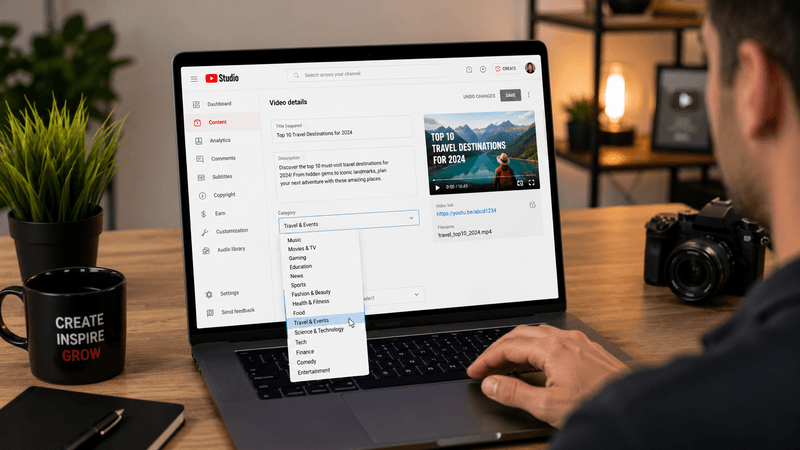
Does YouTube automatically choose my category? No. You choose it yourself in YouTube Studio when uploading. Many creators either leave the default unchanged or pick the closest option without much thought. Once selected, it becomes part of the video's public metadata and can be retrieved through the YouTube Data API.

Can changing my category increase views? There's no public evidence from YouTube that changing a category alone increases views. In my own testing while building the Category Predictor, I've seen situations where fixing an obviously wrong category seemed to help discoverability over time — but I can't confidently isolate that as the cause. Thumbnails, titles, audience retention, and upload timing all play a much bigger role. Treat category as a small metadata signal, not a ranking trick.

Which YouTube category pays the highest? There's no single answer — advertisers bid on audiences, not category labels. Niches like Science & Technology, Education, finance-related content, and Business generally attract higher advertiser demand than entertainment-focused niches, but two channels in the same category can still see very different RPMs. For a deeper breakdown, see my related article: YouTube Categories by RPM: Which Niches Pay the Most?

Why doesn't YouTube have categories like Finance or Health? Because YouTube only exposes 15 official public categories through its API. Topics like finance, health & fitness, food, productivity, and AI aren't official categories — they get folded into broader ones like Education, Howto & Style, or Science & Technology. This is exactly why I trained the AI to recognize more specific topics before mapping them back to YouTube's official system.

Is your AI always correct? No, and no AI tool should claim to be. Some channels are straightforward; others genuinely straddle multiple categories — a programming tutorial could reasonably fit Education or Science & Technology. Clickbait titles, empty descriptions, and multi-niche channels all make prediction harder. That's exactly why YTKits shows both YouTube's official category and the AI's prediction side by side — the goal is to give creators a second perspective, not to override YouTube's data.


How I Researched This Guide

Everything here comes from building the YTKits Revenue Estimator and Category Predictor, reading the official YouTube Data API documentation, testing predictions across thousands of analyzed channels, and comparing those predictions against YouTube's reported categories. Any observation in this article reflects my own development and testing process unless I've explicitly referenced YouTube's official documentation. I'll keep updating this piece as the model improves and more creators use the tool.

Final Thoughts

When I started the Revenue Estimator, I assumed YouTube categories would be one of the easiest pieces of data to work with. Instead, they turned into one of the most interesting parts of the whole project.

YouTube's official categories are intentionally broad, and plenty of creator niches simply don't have one of their own. Category isn't the biggest ranking factor on YouTube — but choosing one that actually reflects your content still beats leaving the default selected or guessing.

That's why I built the Category Predictor: not to tell creators YouTube is wrong, but to give them another way to understand how their content gets classified. If the AI agrees with YouTube, great. If it doesn't, that's your cue to take a closer look and decide what really fits.


Try the Related Tools

🤖 AI Category Predictor — Compare YouTube's reported category with an AI prediction based on your content. Best for checking whether your current category actually represents your channel.

💰 Revenue Estimator — Estimate potential YouTube earnings using channel statistics, content category, and audience location. Best for understanding how niche affects estimated RPM.

🏷️ Keywords Extractor — See the tags and keywords other YouTube videos use. Best for researching competitors and how creators describe their content.


About the Author

Hi, I'm Jayesh Mehta, the creator of YTKits. I built YTKits to make practical tools that help YouTube creators understand their channels using publicly available data and machine learning. Most of the articles on this site come directly from problems I ran into while building those tools — instead of summarizing what's already online, I try to document the actual questions, challenges, and lessons from development so other creators can benefit from them too. I'll keep updating these guides as YTKits grows and I learn more.

Thank you for reading.