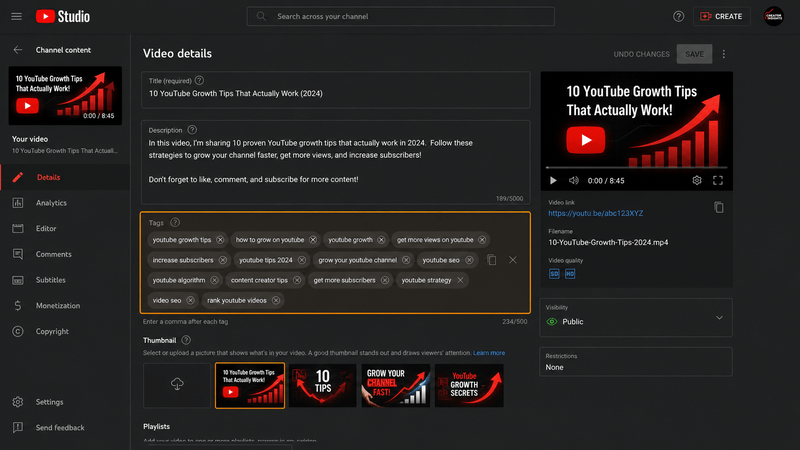
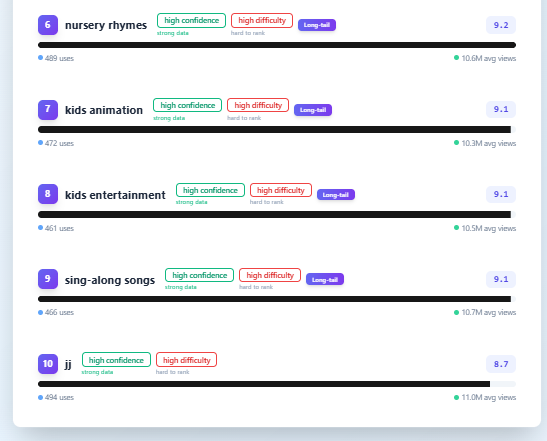
 Example visualization illustrating the general pattern described above — not exact channel figures.
There was a time when I genuinely believed YouTube tags were one of the most important parts of video SEO.
Every upload followed almost the same routine.
Finish editing. Write the title. Upload the thumbnail. Then spend another five to ten minutes researching and adding tags because I thought they would help YouTube understand my video.
I wasn't randomly guessing.
Most of what I learned came from watching YouTube SEO tutorials, reading blog posts and studying the descriptions used by successful creators in my niche.
Almost everyone seemed to agree that tags were important.
So I treated them like an essential part of every upload.
Looking back, I don't regret learning about tags.
I regret how much importance I gave them.
Today my upload workflow looks completely different.
I still add tags.
I just don't expect them to do the heavy lifting anymore.
What Made Me Change My Mind?
The change didn't happen because I read one article saying tags were "dead."
It happened gradually.
Over time I noticed something interesting on my own channel.
Some videos performed well even when I barely thought about tags.
Other videos with carefully chosen tags didn't suddenly rank better just because I spent extra time researching them.
That made me ask a simple question.
Was I optimizing the wrong thing?
The more uploads I published, the more I realized something.
Whenever one of my videos performed well, I could usually explain it by looking at things like:
- The topic people were searching for.
- A stronger title.
- A more attractive thumbnail.
- Better audience interest.
- Better viewer retention.
I almost never looked back and thought,
"That video succeeded because of the tags."
That doesn't mean tags are useless.
It simply means they weren't having the impact I once believed they were.
I Even Tried Uploading Without Tags
At one point I stopped worrying about tags altogether.
Some videos were uploaded without adding any tags.
Honestly...
Nothing dramatic happened.
Videos still reached my returning audience.
Suggested videos continued bringing traffic.
Performance mostly depended on the quality of the content itself.
However, I still think tags can provide useful context in certain situations—especially when someone is searching for very specific topics on YouTube.
Because of that, I haven't completely stopped using them.
I've simply reduced them to a much smaller part of my upload process.
My Workflow Today Looks Very Different
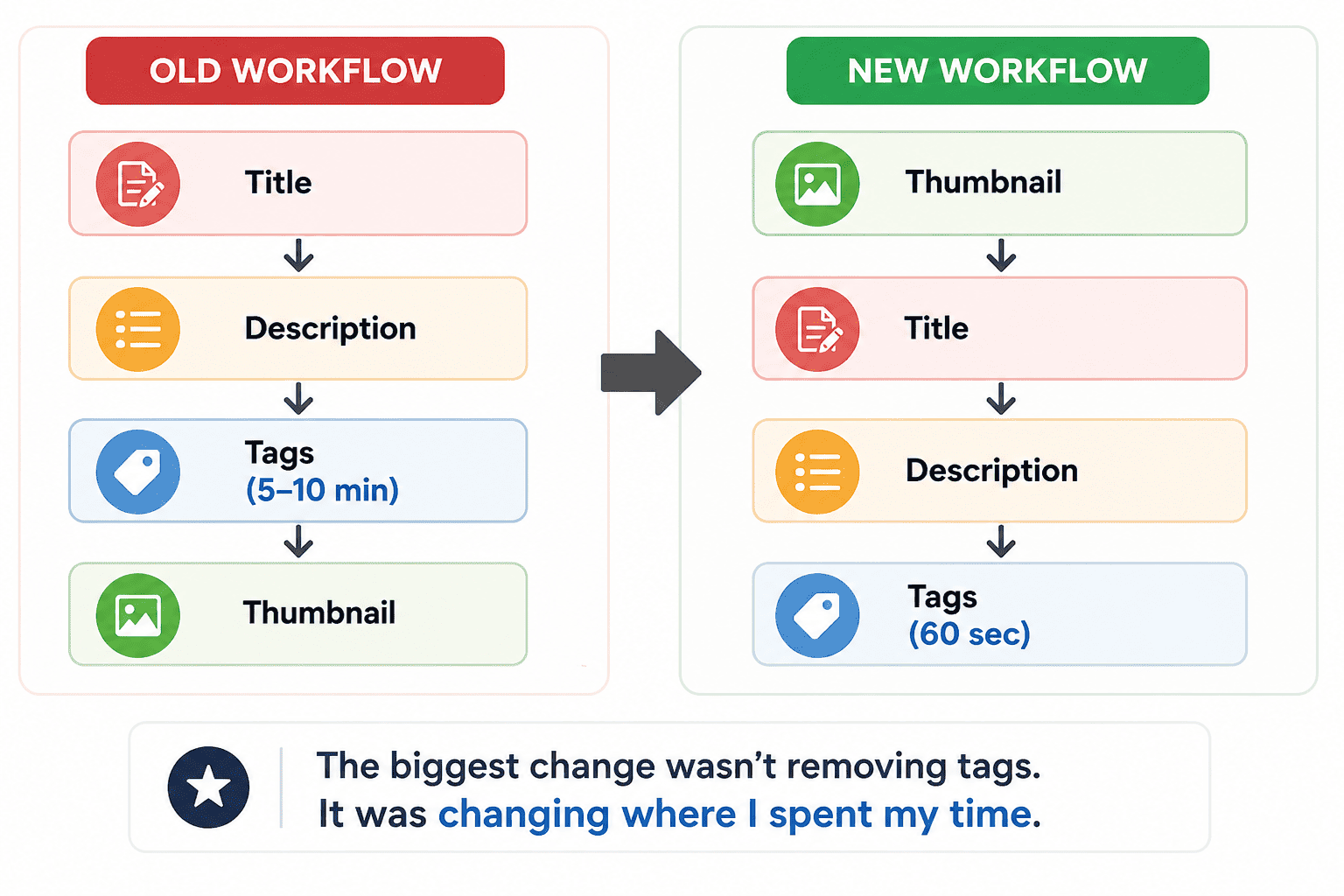
A few years ago, my priorities looked something like this.
Title
↓
Description
↓
Research tags (5–10 minutes)
↓
Thumbnail
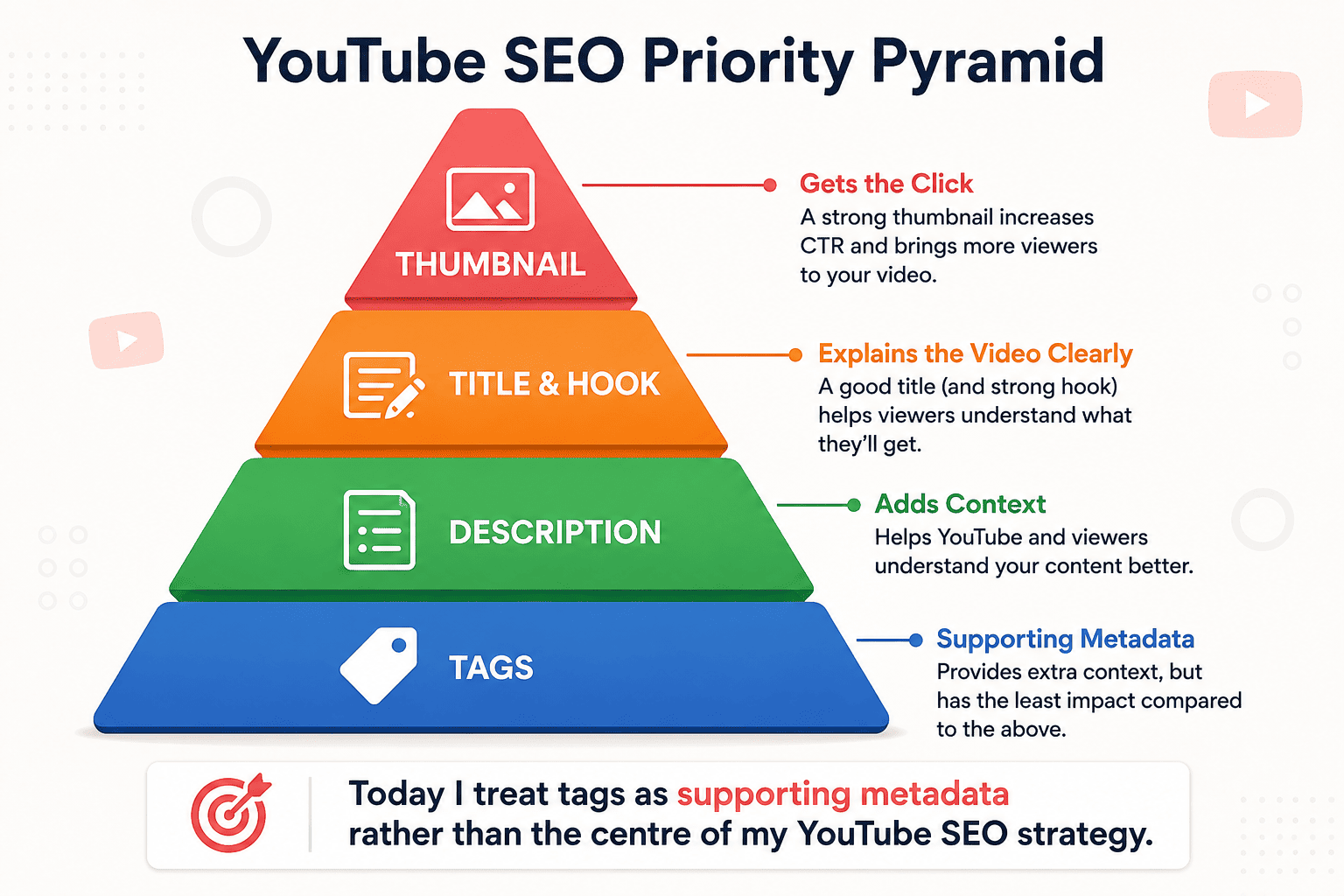
Today they look more like this.
Thumbnail
↓
Title
↓
Description
↓
Tags (about 60 seconds)
That single change has probably saved me hours over the years.
More importantly, it helped me focus on the parts of YouTube SEO that consistently had a much bigger impact on my channel.
The biggest change wasn't removing tags. It was changing where I spent my time.
Why I Still Use Tags
One thing that often surprises people is this:
I haven't stopped using tags.
I simply stopped expecting them to solve problems that were actually caused by weak titles, thumbnails or content.
Today I normally add only three relevant tags.
They're closely related to the video's topic.
I don't fill the entire tag field.
I don't copy dozens of competitor keywords.
And I definitely don't add unrelated trending topics hoping to gain extra views.
For me, tags are simply one small way of giving YouTube additional context about the video.
Nothing more.
Nothing less.
Building a Keyword Tool Changed How I Think About SEO
The biggest change in my thinking didn't actually come from uploading more videos.
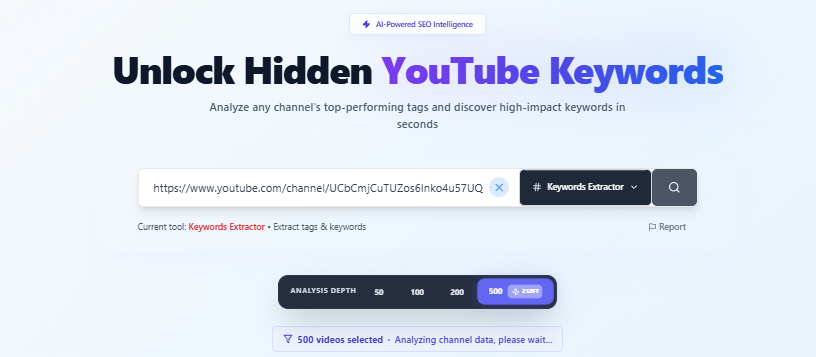
It happened while I was building the YTKits Keywords Extractor.
Originally, I wasn't trying to build another tool that simply copied tags from YouTube videos.
I wanted to answer a much more useful question.
What topics are successful channels consistently creating content about?
That's why the tool works differently.
Instead of analyzing just one video, it can analyze a channel's most recent:
- 50 videos
- 100 videos
- 200 videos
- 500 videos
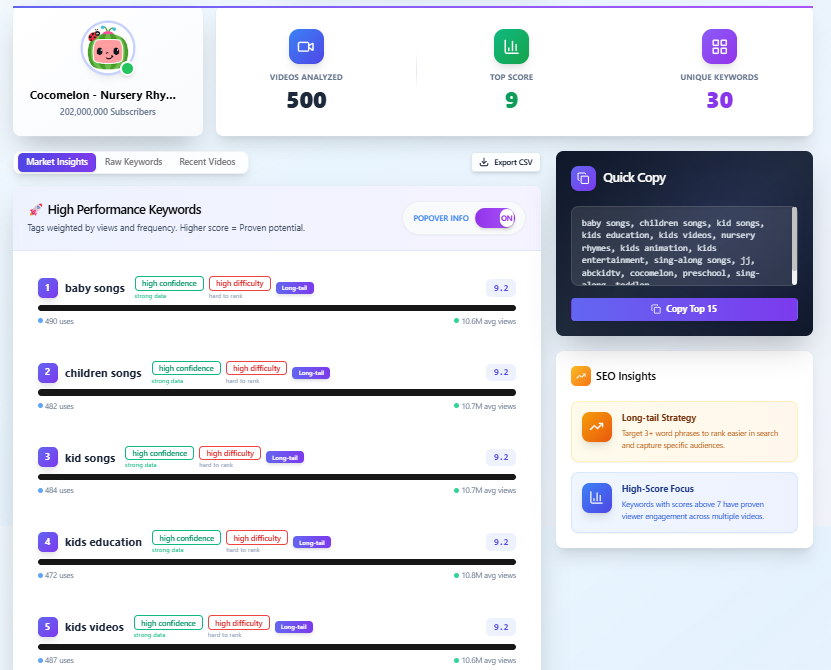
From there, it identifies recurring keywords and scores them based on how frequently they're used and how those videos have performed.
That completely changed the way I look at YouTube SEO.
Instead of asking,
"What tags should I copy from this video?"
I started asking,
"What topics does this creator consistently succeed with?"
Those are two very different questions.
Instead of copying one video's tags, I built a tool to identify recurring keyword opportunities across an entire channel.
The Biggest Mistake I See Beginners Make
One mistake appears again and again.
People spend hours trying to optimise tags before they've even finished writing a strong title.
I've been there myself.
It's easy to think SEO starts with metadata.
In reality, my own uploads have taught me something different.
If I have an extra ten minutes before publishing, I'm almost never spending that time researching more tags.
Instead, I'll usually ask questions like:
- Can the thumbnail be clearer?
- Is the title more interesting?
- Does the first 30 seconds hook viewers quickly?
- Does the description explain the video properly?
Those changes have consistently felt more valuable than adding another ten tags.
That's why tags now sit near the bottom of my upload checklist.
Where I Think Tags Still Help
Although I no longer spend much time on tags, I haven't removed them completely.
I still think they're useful in a few situations.
For example, I usually add:
- The main topic of the video.
- Common variations of that topic.
- Important product or game names that viewers might search for.
For most uploads, that ends up being only three relevant tags.
I don't try to fill the entire tag field.
I don't copy dozens of keywords from competitors.
And I don't add unrelated trending topics hoping YouTube will recommend my video.
To me, tags are simply another way of giving YouTube a little more context.
They're part of the upload process—not the strategy itself.
What I Never Do Anymore
There are several habits I stopped years ago.
❌ Copying long lists of competitor tags. ❌ Adding unrelated trending keywords. ❌ Filling the entire tag field just because the space exists. ❌ Expecting tags to rescue a weak title or thumbnail.
Looking back, those habits weren't making my videos better.
They were simply giving me the feeling that I was doing more SEO.
There's a big difference between being busy and being effective.
So... Do YouTube Tags Still Matter?
After years of uploading videos and changing the way I approach SEO, my answer is much simpler than it used to be.
Yes—but not enough to obsess over.
That's probably the biggest lesson I've learned.
I don't think tags are completely useless.
If I did, I wouldn't spend the extra minute adding them to every upload.
At the same time, I don't expect them to transform a video's performance.
For me, tags are one small part of a much bigger SEO process.
The real work still happens before I even reach the tags section.
What Actually Deserves Your Time
When I first started YouTube, I believed SEO mostly meant filling in metadata.
Today my priorities look completely different.
If I have an extra 20 minutes before publishing a video, this is roughly how I'd spend it.
| Task | Priority | Why |
|---|---|---|
| Improve the thumbnail | ⭐⭐⭐⭐⭐ | Better click-through rate often leads to more impressions and views. |
| Rewrite the title | ⭐⭐⭐⭐⭐ | A clearer title helps viewers immediately understand the topic. |
| Improve the first 30 seconds | ⭐⭐⭐⭐⭐ | Better retention gives viewers a reason to keep watching. |
| Update the description | ⭐⭐⭐⭐ | Adds context and useful information for viewers. |
| Add relevant tags | ⭐⭐ | Useful as supporting metadata, but not my primary focus. |
That's a very different workflow from the one I followed years ago.
Ironically, spending less time on tags has made me spend more time improving the parts of my videos that viewers actually notice.
Today I treat tags as supporting metadata rather than the centre of my YouTube SEO strategy.
What YouTube Says About Tags
One reason my opinion changed over time is that I started reading YouTube's own documentation instead of relying only on SEO advice.
YouTube's own help documentation states that tags "can be useful if the content of your video is commonly misspelled," but that "otherwise, tags play a minimal role in your video's discovery" — and it specifically names title, thumbnail, and description as the more important pieces of metadata for discovery. (YouTube Help: Add tags to your YouTube videos)
That matches my own experience.
The videos that performed best on my channel weren't successful because I found the perfect set of tags.
They succeeded because people wanted to click on them and continue watching.
Where I Still Think Tags Are Useful
Although I don't spend much time researching tags anymore, there are a few situations where I still think they're worth adding.
Different spellings
Some topics have multiple ways of being written.
For example:
- BGMI
- Battlegrounds Mobile India
or
- AI
- Artificial Intelligence
Adding the most common variations makes sense because viewers may search using different terms.
Well-known abbreviations
Many creators naturally search using acronyms.
Examples include:
- FPS
- VPN
- GTA
- PUBG
If the acronym is central to the topic, I'll often include it alongside the full name.
Keeping the Topic Clear
My tags almost always reflect exactly what the video is about.
I avoid adding unrelated trends or popular keywords simply because they're getting attention.
In my experience, if someone clicks expecting one topic but finds something completely different, everyone loses—including the viewer.
What I Think Beginners Should Stop Doing
If someone starting YouTube asked me how to improve their SEO today, I wouldn't tell them to spend another 20 minutes researching tags.
I'd tell them to spend those 20 minutes somewhere else.
Usually that means:
- Testing a better thumbnail.
- Writing a stronger title.
- Improving the first minute of the video.
- Making the content more useful.
Those changes have consistently had a much bigger impact on my own uploads than expanding my tag list ever did.
Tags still have a place.
They're just no longer the first place I look.
Behind This Article
This article isn't based on reverse-engineering YouTube's algorithm.
It's based on how my own workflow has changed over several years of creating YouTube content.
When I first started learning YouTube SEO, I followed the same advice many new creators still follow today.
I watched YouTube tutorials.
I studied successful creators.
I copied SEO techniques that seemed to work.
Like many beginners, I assumed spending more time on tags would naturally lead to better rankings.
Over time, that belief changed.
Partly because of my own uploads.
And partly because I started building tools for YouTube creators.
While developing the YTKits Keywords Extractor, I spent a lot of time studying how successful channels repeatedly target topics instead of simply copying tags from individual videos.
That process changed the questions I asked.
Instead of:
"What tags should I use?"
I started asking:
"What topics consistently perform well for this channel?"
That shift completely changed the way I approach YouTube SEO today.
My Advice If You're Starting YouTube Today
If I were helping someone upload their very first YouTube video, this is the advice I'd give.
✅ Spend most of your SEO effort on the thumbnail and title. ✅ Make sure your content actually delivers what the title promises. ✅ Use a few relevant tags, but don't expect them to carry the video. ✅ Avoid copying unrelated or trending tags that don't match your content. ✅ Review your analytics after publishing and improve your next upload instead of endlessly editing metadata.
The biggest improvement usually comes from making better videos—not from filling every optional field on the upload page.
Quick Checklist Before You Publish
Before clicking Publish, I usually ask myself:
- Is my thumbnail clear enough to make someone stop scrolling?
- Does the title accurately explain the video?
- Does the opening of the video immediately explain what viewers will get?
- Have I written a short, useful description?
- Have I added a few relevant tags that match the topic?
If the answer is "yes" to those questions, I'm happy to publish.
Frequently Asked Questions
Do YouTube tags still matter in 2026?
Yes—but in my experience, they're a supporting part of YouTube SEO rather than the main strategy.
I still add a few relevant tags to every upload, but I spend much more time improving my title, thumbnail and content.
How many YouTube tags should I use?
There isn't an official number.
Personally, I usually add around three highly relevant tags that accurately describe the video's topic.
I prefer a few relevant tags over a long list of loosely related keywords.
Should I copy tags from other YouTube videos?
I don't recommend copying tags blindly.
Instead, try to understand why successful creators repeatedly make videos around certain topics.
That's one of the reasons I built the YTKits Keywords Extractor—to identify recurring keyword opportunities across an entire channel instead of focusing on one video's tags.
Can YouTube penalize misleading tags?
YouTube expects metadata to accurately describe your content.
From my own experience, I avoid adding unrelated tags because they don't accurately represent the video and can create a poor experience for viewers.
Keeping tags relevant is always the safer approach.
Are titles more important than tags?
For my own channel, absolutely.
If I only had time to improve one thing before publishing, I'd choose the title or thumbnail every single time.
Those have consistently made a much bigger difference than spending extra time researching tags.
Final Thoughts
If you had met me a few years ago, you probably would've found me spending another ten minutes researching tags before every upload.
Today, my workflow is much simpler.
I still use tags.
I just don't expect them to solve problems they were never designed to solve.
The biggest lesson YouTube has taught me is that good SEO starts long before the upload screen.
It starts with choosing a topic people care about.
Writing a title that earns the click.
Designing a thumbnail that stands out.
And creating a video that keeps viewers watching.
Tags still have their place.
They're just one small piece of a much bigger picture.
If there's one thing I wish someone had told me when I first started, it's this:
Use tags—but don't let them distract you from the things that actually make people watch your videos.
That single lesson has probably saved me more time than any SEO trick I've ever learned.
Related YTKits Resources
If you're learning YouTube SEO, these tools and guides may also help:
- Keywords Extractor — Analyze recurring keyword opportunities across an entire YouTube channel.
- Youtube Thumbnail Guide — Learn how to create compelling thumbnails.
- Revenue Estimator — Estimate potential earnings based on your channel's niche and views.
- Monetization Checker — Check whether a channel appears to be monetized.