How to Recover a Declining YouTube Channel (What Actually Worked When Mine Crashed)
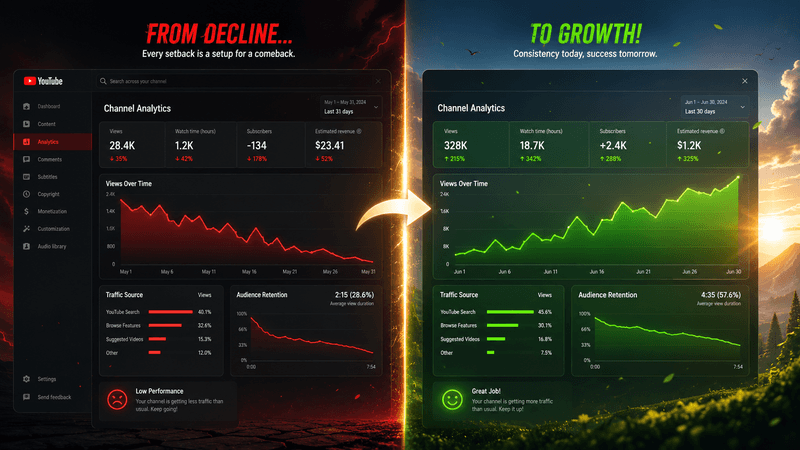
About 18 months ago my channel was averaging maybe 80K views per video. Then one month it dropped to 50K. Next month, 30K. Then 18K. Then 12K.
I've never felt worse on YouTube than during those four months. Same effort, same upload schedule, same channel. Views just kept falling off a cliff. I genuinely thought I was finished.
I'm writing this because I came out the other side — not back to my peak, but stable at around 45-50K per video — and the recovery process was nothing like what most "fix your channel" articles recommend. So here's what actually worked, what I tried that didn't, and the playbook I wish I had during those bad four months.
Stop Doing the Wrong Things First
Before anything productive, the panic responses you have to resist:
Don't post more videos faster. This is the universal panic move and it almost always makes the decline worse. More content with bad performance just trains the algorithm to show you to even fewer people. Quality over quantity matters way more during decline than during growth.
Don't pivot your entire channel direction. Switching niches mid-decline is panic-driven and rarely works. You lose your existing audience without gaining a new one fast enough to make up for it. I almost did this. So glad I didn't.
Don't blame the algorithm publicly. Lots of creators start ranting about "the algorithm hates me" in their videos. Achieves nothing. Signals desperation in your content. Just don't.
Don't compare yourself to channels at different sizes. "This other 10K channel got a million views, why can't I?" That's noise. Your data is the only data that matters.
Don't go silent for a month while you "figure it out." Going dark lets your channel decay further. You need data to diagnose, and data requires uploading.
Now that you're not actively making things worse, here's what to actually do.
Diagnose Before You Treat
You cannot fix a decline without knowing what kind of decline you're dealing with. There are basically five patterns and each one needs a different fix.
Pattern A: Cliff Drop, All Videos
Views fell off a cliff on a specific date and EVERYTHING is down — your old videos and new ones. Usually means:
- An algorithm update recategorized your channel
- A demonetization issue (yellow icons spreading)
- A Community Guidelines warning you missed
Check YouTube Studio for any policy notices first. Look at your videos for sudden yellow monetization icons. If neither — an algorithm shift probably happened. Wait 2-3 weeks before reacting because sometimes views recover automatically.
Pattern B: Gradual Slide Over Months
This is what happened to me. Slow bleed. Each video performs slightly worse than the one before. CTR has been creeping down for weeks. Most common pattern.
Cause: content fatigue. Your audience has seen your format too many times. The algorithm reads slowing engagement and reduces your reach in response, which lowers engagement further, which lowers reach further. Death spiral.
This is the "refresh required" pattern. Covered below.
Pattern C: New Videos Bombing, Old Videos Fine
Recent uploads are tanking but your back catalog is still getting normal views.
Cause: something specific changed in your recent content. New thumbnail style? New topic angle? Different runtime? Different host energy? Find the variable.
A/B compare your last three flops against your last three hits before the decline. The change reveals itself usually within 10 minutes of looking.
Pattern D: Old Videos Fading, New Ones OK
Your evergreen back catalog is bleeding views. Search traffic is dropping. New uploads still perform fine.
Cause: competitors created better, more recent content on the same topics. Or YouTube updated which videos get pushed for certain searches.
Refresh your top old videos. Update titles, thumbnails, descriptions. Sometimes re-uploading makes sense if something's really old.
Pattern E: Chaos, No Pattern
Some videos hit, some flop, no obvious through-line.
Cause: algorithm is confused about your channel. You've been inconsistent with topics or formats, and YouTube doesn't know who to recommend you to anymore.
Re-niche tight. Make 5-10 videos on tightly related topics in a row so the algorithm relearns who watches you. Then you can expand again.
Actually Pull Up Your Data
Stop guessing. Open YouTube Studio and look at the numbers. Specifically:
Audience retention over time. Compare last 30 days to the 30 before that. If your average dropped from 45% to 30%, that's your problem. The algorithm cares more about retention than almost anything.
Click-through rate trend. CTR dropping usually means thumbnails are stale or you've drifted into less compelling topics. CTR under 4% on a growing channel is a red flag.
Traffic source breakdown. Did "Browse" (homepage) traffic drop? Algorithmic issue. Did "Search" traffic drop? SEO issue. Did "External" traffic drop? You lost outside referrals. Each tells a different story.
Subscriber view percentage. Are your subscribers still watching but new viewers aren't seeing you? Or have your subscribers stopped engaging too? Different problems with different fixes.
Average view duration in absolute seconds (not percentage). If your videos got longer but absolute view duration dropped, you padded too much.
The analytics guide has more on which metrics matter most for this.
The Actual Recovery Plays
Once you know what pattern you're dealing with, here's how to handle each one.
For the Gradual Slide (Pattern B, most common)
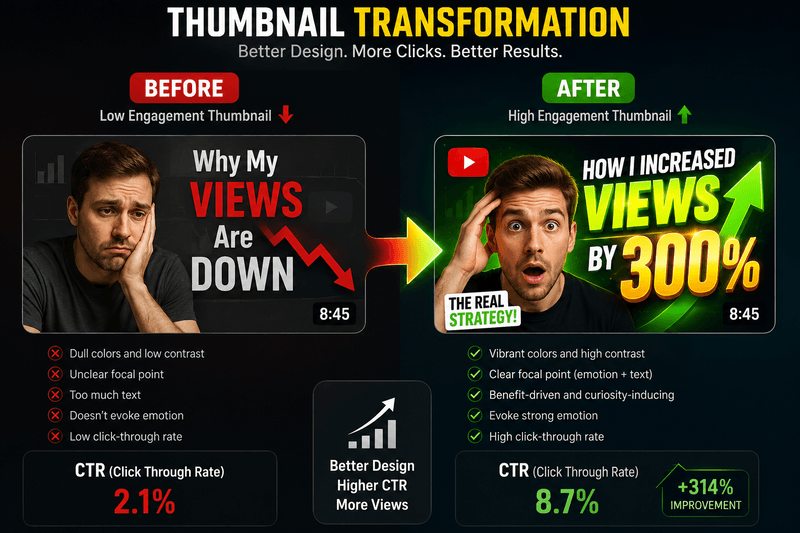
Refreshing your thumbnail style can break the decline pattern
This is what I had. The fix is a real refresh — not a small tweak.
Week 1: Pause routine uploads. Don't post for 7-10 days. Use that time to analyze and plan.
Weeks 2-3: Plan and produce 5 differentiated videos. Each one should test a different variable from your normal content:
- New thumbnail style
- New title format
- New length range
- New topic angle within your niche
- New opening hook structure
Weeks 3-4: Upload all 5 in two weeks. The cluster matters. Don't space them across 3 months because the signal gets lost.
Week 5: Review which performed best. Double down on that direction for the next 5 videos.
This usually breaks the decline within 4-6 weeks. What's actually happening: the algorithm sees a clear signal that something's different and retests your channel with a fresh audience. If even one of the five tests hits, that's the new direction.
For me, the variable that turned out to matter was thumbnail style. My old thumbnails had drifted toward a cluttered look. Once I simplified, CTR came back up over the next six weeks.
For the Cliff Drop (Pattern A)
Don't react quickly. Algorithm shifts often correct within 2-3 weeks. Watching your channel die hour by hour and panic-changing things is the worst move.
Weeks 1-2: Keep posting normally. Resist the urge to overhaul anything.
Week 3: Still down? Check your video monetization icons. If yellow icons have spread, you drifted into limited monetization territory. Adjust title/thumbnail wording to dodge trigger keywords.
Week 4: If neither monetization nor algorithm seems to be the cause, treat it like Pattern B and run the refresh playbook above.
For New Videos Bombing (Pattern C)
You need to isolate exactly what changed.
List 3 hits from before the decline and 3 misses from after. Compare them on:
- Title style
- Thumbnail style
- Length
- Opening 30 seconds
- Topic
- Posting time
- Description first two lines
- End screen / CTA
You're looking for the one or two variables that flipped. It's usually thumbnail or topic angle, sometimes both.
Once you identify the change, reverse it for your next 3 videos. Go back to what was working before. Don't get clever about it. Boring works.
For Back Catalog Bleed (Pattern D)
Refresh your top 10 evergreen videos:
- New thumbnail in your current best style
- Updated title (current year if relevant, refreshed hook)
- Refreshed first sentence of description
- Pinned comment with updated context
The algorithm treats refreshed videos almost like new uploads for ranking purposes. Evergreen traffic can come back fast if you do this well.
For Chaos (Pattern E)
Re-niche aggressively. For the next 5 uploads stay tightly focused on ONE topic area. Pick whatever has historically performed best. The goal is to let the algorithm relearn who your audience is.
After those 5 perform consistently, you can expand topics again. But not before. The temptation to "try something different" is what got you into chaos in the first place.
Stuff That Helps Regardless of Pattern
A few things that boost recovery no matter what pattern you have:
Make a couple videos targeting search terms you know perform. Search traffic is a strong "new audience" signal. Use the Keywords Extractor to find high-volume topics in your niche and create content matching them.
Engage with your existing audience hard. Reply to every comment for 30 days. Engaged communities signal "loyal audience" to the algorithm and that boosts recommendations.
Promote new uploads outside YouTube. External traffic in the first 24 hours signals interesting content. Even small amounts from Twitter, Discord, your email list — anything helps.
Pin your best comment. Visible engagement signals "alive channel" to the algorithm and to new visitors browsing.
What I Tried That Didn't Work
For the record:
Changing my upload day. Did nothing.
Buying a fancy new camera. Did nothing for views. People watch for content, not 4K.
Making "controversial takes" to drive engagement. Got me a few angry comments. Didn't actually move views.
Following a "guru's" course. Generic advice. None of it specific to my data.
Making longer videos because "longer is better." Killed my retention. Made things worse for 2 months.
The fix in every case was paying attention to my actual analytics and making changes based on my actual data, not generic advice.
When You Actually Should Pivot
There are situations where a decline is a signal to change direction:
- Your niche has structurally died (a platform you covered shut down, a trend really is over)
- Your niche has a hard monetization ceiling you'll never get past
- You stopped enjoying the content months ago
- You've genuinely exhausted your topic area after years of coverage
If any of those apply, pivot. But pivot with a 6-month plan, not as a panic response to one bad month.
For me, none of those applied. The niche was fine. My problem was content fatigue and stale thumbnails. Once I fixed those, recovery happened.
Honest Talk
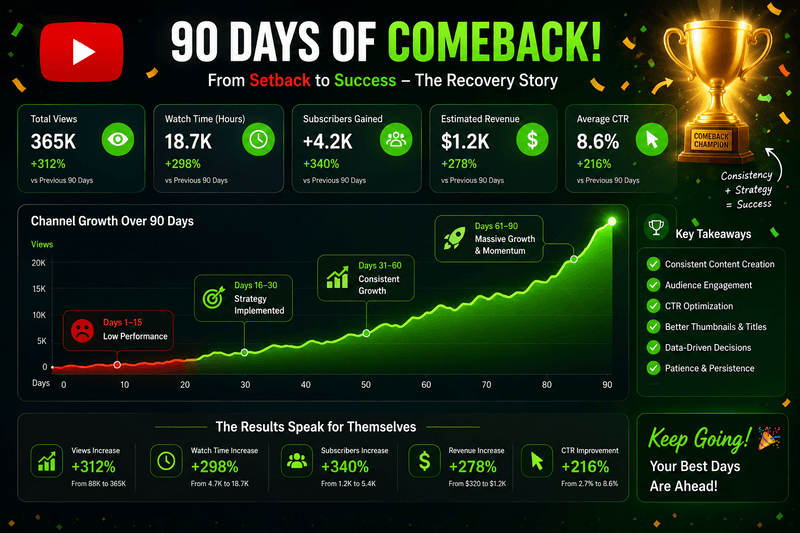
Recovery takes 4-6 weeks but the pattern is clear when it works
Most channel declines are recoverable. But "recovery" rarely means going back to your peak. Sometimes it means accepting a smaller stable audience and building from there.
That's not failure. Most channels never have one peak, let alone two. If you had a real run of growth, took a hit, and now sit at 60-80% of your peak with stable engagement, you're doing better than 99% of creators who ever started a channel.
The creators who recover are the ones who stay analytical when emotional. The data is right there. The patterns are clear if you look. Use them.
Related Tools
- Keywords Extractor - Find high-volume search topics to revive views
- Monetization Checker - Verify monetization status during recovery
- Revenue Estimator - Project recovered earnings based on view growth
- Category Checker - Confirm your channel category still matches your content